
Van platform of theme wisselen zonder openstaande orders te verliezen
Een migratie breekt orders maar op twee manieren: hernummerde variant-ID's en ingetrokken schrijfrechten. Al het andere is presentatie.
Kernpunten
- Classify the move first: presentation, identity, or platform. Only a platform change breaks bound sources.
- Export open orders with state and supply link before you touch anything.
- Reconnect and rebind on the new store, then place one test order end to end.
- Keep the old connection live until the last open order is delivered and its return window has closed.
- Gap orders, paid on the old store and shipped after cutover, are the ones that need a manual fallback.
Which parts of a store move actually threaten open orders
You are migrating on Saturday. There are 240 paid orders that have not shipped, and roughly 40 of them have a supply link bound to a variant that is already selling. The theme is not your risk. The variant identifiers are.
A store move breaks orders in exactly two ways. It renumbers something that a supply link points at, or it revokes the permission that lets tracking be written back. Everything else, including most of what feels dangerous during a migration, is presentation.
| Migration | What it touches | Threat to open orders | What survives |
|---|---|---|---|
| Theme swap | Templates, sections, CSS, storefront markup | None to order data or supply links | Everything |
| Domain change | Storefront URL, links in emails, some app redirect URLs | Low; breaks customer-facing links, not data | Order identifiers, variant identifiers, bindings |
| Platform change (Shopify to WooCommerce or back) | Platform, order identifiers, product identifiers, variant identifiers, API credentials | High | Only what you exported yourself |
| App reinstall or reconnect | Authorisation token, webhooks, write-back permission | Medium, and it lands on write-back | Bound links, which live on our side |
| Plan downgrade | Staff accounts, API permissions, installed app slots | Silent: write-back stops without raising an error | Data, but the pipeline stops quietly |
| Category and URL restructuring | Product handles, collection URLs, pagination | Medium for imported catalogue links | Order data and bindings |
Read the pattern off the table rather than memorising it. Anything that renumbers a variant breaks a bound source, because a variant identifier is local to the platform that issued it. Anything that renumbers an order breaks write-back, because the write-back target is that order record. Anything that quietly revokes a permission breaks both, and it breaks them without telling you, which is why a plan downgrade deserves more respect than it usually gets.
The order of operations when the platform itself changes
Do these in this order. The sequence is the whole point: steps 7 and 8 are the ones merchants invert, and inverting them is what loses orders.
- Freeze new imports and new source bindings on the old store. Artefact: a freeze date, written down.
- Export every open order with its state, its line items, its supply link, and the timestamp of its last event. Artefact: the open-order export.
- Build the new store and migrate the catalogue into it.
- Connect the integration to the new store and place one test order. Artefact: a test order that appears in the order list with correct line items.
- Rebind each selling variant to its supply link in the new store's identifier space. Artefact: a binding map, one row per selling variant.
- Resume imports on the new store only, and leave the old store otherwise untouched.
- Keep fulfilling the remaining open orders through the old connection until the last one reaches delivered.
- Disconnect the old store only after the last open order is delivered and the return window on those purchases has closed. Artefact: a recorded disconnection date.
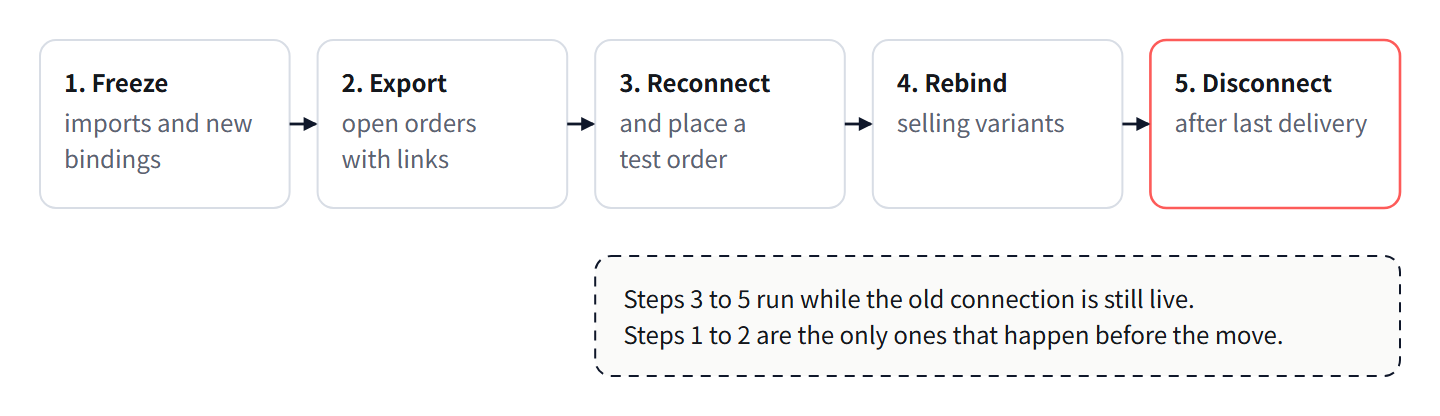
The mistake is step 8 arriving early. A merchant finishes the new store, feels done, disconnects the old one, and discovers two weeks later that 40 tracking numbers had nowhere to land. The order's state history and the write-back target live on the platform where the order was created. Once the connection is gone, tracking cannot be written to that order at all, and the customer gets silence instead of a number. There is a second reason to wait: purchases carry a seven-day return window, and disconnecting inside that window can strand a return that has already been agreed.
What happens to bound sources and imported links on each migration type
There are two different kinds of link and they behave differently. A bound source is a supply link attached to a variant that is already selling in your store, used when you already own the link. An imported product is pushed from a marketplace into the store as a draft or live product, which is the normal catalogue path. The difference matters here, because bindings are anchored to store-side identifiers and imports are anchored to ours.
| Migration | Bound sources | Imported products | What you must redo |
|---|---|---|---|
| Theme swap | Unaffected | Unaffected | Nothing |
| Domain change | Unaffected | Unaffected | Replace any hardcoded return or tracking URLs in customer emails |
| Platform change | Broken: the variant identifier does not exist in the new identifier space | Survives on our side; the store-side product must be re-published or remapped | Rebind every selling variant, one row at a time |
| App reinstall | Survive on our side; the write-back target must be re-authorised | Survive | Reconnect, then prove it with one test order |
| Plan downgrade | Survive | Survive | Re-check the API permission and the staff account the integration uses |
The practical consequence is that catalogue work survives a migration better than bindings do. If you built the catalogue through imports, the supply side is intact and you are re-publishing. If you built it by binding links to variants you were already selling, you are rebuilding the map by hand, which is why step 5 of the sequence exists and why it should be done variant by variant, starting with the ones that actually sell.
Pre-migration checklist: the artefacts you keep
Each item is something you would not be able to reconstruct after the cutover.
- Open-order export: order reference, date, state, line items, supply link, last event timestamp. Artefact: one spreadsheet.
- Binding map: store variant identifier to source link, one row per selling variant, including variants that sell rarely.
- A list of orders sitting in the weighed-and-quoted state with a shipping payment awaiting your approval.
- A list of orders with a purchase placed but not yet dispatched by the seller.
- Inbound receipts and the QC photo sets for anything already at the warehouse.
- Seller conversation records for every open purchase, including any agreed substitutions.
- A list of store-side automations that write to orders: fulfilment apps, email flows, review requests, and anything that sets a fulfilment status.
- The remaining return window on each recent purchase, so you know how long the old connection has to stay alive.
Item 7 is the one that causes the surprising failures. An automation that sets a fulfilment status on the old platform keeps doing it after the cutover, and starts fighting the write-back on the new one.
Keeping tracking write-back alive across the cutover
Write-back targets the order record on the platform where the order was created. After a platform change, the old order identifiers do not exist in the new store, so there is nothing to write to. Two things follow. Keep the old connection alive in write mode until the last open order reaches delivered, and do not delete or close the old store during the overlap, because a closed store cannot receive a tracking number.
Orders that fall in the gap are the ones paid on the old store and shipped after the cutover. You have three options.
| Option | When to use it | Work it costs | Risk it leaves |
|---|---|---|---|
| Delay the cutover until gap orders ship | You control the date and the order count is small | None | None, but it pushes the migration back |
| Run both connections through the overlap | Normal case | One extra store subscription for the overlap period | Low; tracking lands on the old order, and you mirror the number into a customer message |
| Disconnect and handle gap orders by hand | Only when the old store must close on a fixed date | One lookup plus one message per gap order | High: missed writes, orders marked fulfilled with no number |
Here is the arithmetic on the third option, so the choice is not made by feel. Assume a daily order rate of 20. Assume the average interval from purchase to outbound first scan is 6 days, taken from your own last 50 orders rather than from any published figure. Assume the cutover happens with the old store live up to and including day 0.
Gap orders are the orders placed in the 6 days before the cutover that have not yet shipped: 20 multiplied by 6, which is 120 orders. Handling each one by hand means finding the carrier tracking, opening the old order record, and writing to the customer; assume 1.5 minutes each. That is 120 multiplied by 1.5, which is 180 minutes, or 3.0 hours of manual work.
Holding the old connection for those 6 days costs 0 minutes of manual work. Shortening the overlap to 3 days halves the gap orders to 60 and halves the manual work to 1.5 hours. The work scales linearly with the overlap length, which is the argument for scheduling the cutover in a quiet week rather than at the end of a busy one.
Post-migration verification: five checks
Run these in order, and do not announce the migration is finished until all five pass.
- Test order end to end. Place one order in the new store and confirm it appears in the order list with the right line items and the right variant mapping. Artefact: a synced test order, which you then cancel or refund.
- Binding check. For one rebound variant, confirm the purchase goes to the intended source link and not to a similar one. Artefact: one purchase placed at the intended marketplace seller.
- Write-back check. Ship that test order and confirm the tracking number lands on the correct order and line in the new store. Artefact: a tracking number visible on the new store order.
- Duplicate check. Compare the order count in the new store against the pre-migration export, because re-authorising can re-sync historical orders. Artefact: a reconciliation note with the two counts.
- Open-order reconciliation. Match the pre-migration open-order export line by line against the live list. Artefact: a signed-off list, with every unmatched line explained rather than ignored.
Veelgestelde vragen
Can I swap the theme while orders are open?
Yes. A theme is the presentation layer and it touches neither order data nor supply links. The only thing to check afterwards is that any customer-facing status page still renders, because some themes build it from order metafields.
Do I have to rebind sources after moving from Shopify to WooCommerce?
Yes, every one of them. A bound source points at a variant identifier issued by the old platform, and that identifier does not exist in the new store. Imported products survive on our side and only need re-publishing.
Will tracking still be written back after I disconnect the old store?
No. Write-back needs a live connection and an existing order record. Disconnect first and the tracking numbers for gap orders have nowhere to land.
Can I run both stores at the same time?
Yes, and it is the recommended shape. Both connections live during the overlap, old orders fulfil through the old one, new orders through the new one, and you disconnect the old one last.
What breaks if I downgrade my plan?
Usually nothing visible at first, which is the problem. Check the API permission and the staff account the integration uses, because a revoked permission stops write-back without raising an error anywhere you would notice.
Wat deze week te doen
- Export every open order with its state and supply link before you change anything else.
- Write down the expected delivery of your oldest open order and set the disconnection date after it, plus the return window.
- Connect the new store and place one test order end to end before migrating any real data.
- Rebind the top selling variants first rather than the whole catalogue, then work down.
- Reconcile the order list line by line after the cutover, and treat every unmatched line as a problem until it is explained.
Geschreven en onderhouden door het sourcingteam van Lovegodrop. Hoe deze pagina's worden geschreven en gecontroleerd.
Begin met een order die u al heeft verkocht
Verbind een Shopify- of WooCommerce-winkel, kies een betaalde order en bekijk de inkoop- en verzendofferte voor precies die order voordat u iets vastlegt.