
스토어를 건드리지 않고 기존 주문 처리하기
테마·결제·앱은 읽기 전용. 쓰는 것은 트래킹 하나. 스토어를 위험에 빠뜨리지 않고 3건으로 파일럿하는 법.
핵심 요약
- Theme files, checkout, apps and store settings are not read for modification and not written at all.
- Two things are read: order data, and the product and variant data needed to identify what was sold. One thing is written: tracking and fulfilment back to the order.
- Refuse any scope that writes products, inventory, customers or theme assets. None of it is needed to fulfil an order.
- A pilot is three orders across three risk levels, with the pass condition defined before the first one is sourced.
- Authorisation and a bound source can be unwound. A dispatched parcel and a sent email cannot.
The objection, stated plainly
"I am not risking my theme or my checkout for a fulfilment test."
That is a fair position, and it deserves a specific answer rather than a reassurance. Your storefront is the asset. A fulfilment experiment is worth running only if it cannot damage the thing that produces the orders.
So here is the specific answer. The integration is an authorisation, not an installation into your front end. It reads orders and the product data needed to identify what was sold, and it writes one thing back: tracking and fulfilment on the order. No template file is edited. No app is layered over your stack. No shipping zone, tax class or checkout setting is altered. Inventory counts in your store are left alone.
The distinction that matters is between reading a store and rewriting one. Most merchant anxiety comes from tools that publish products, overwrite stock numbers or inject scripts. None of that is required to ship an order someone already paid for, so none of it happens.
| Question | Answer |
|---|---|
| Does anything appear on the storefront? | No. Nothing is published or rendered |
| Is checkout modified? | No |
| Are apps added or removed? | No |
| Is inventory in your store overwritten? | No |
| Does the customer see anything new? | Only the tracking notification your own store sends |
Store surface by surface: read, written, untouched
This is the table to check against your own risk list. If a surface you care about is not on it, ask before you connect.
| Surface | Status | What actually happens |
|---|---|---|
| Theme files and assets | Untouched | No template, style or asset write |
| Checkout and payment flow | Untouched | No script injection, no step added |
| Apps and plugin configuration | Untouched | Nothing installed over your stack |
| Settings, shipping zones, tax classes | Untouched | Configuration is not read for modification |
| Product and variant records | Read | Used to identify what the order sold |
| Customer records | Read | Name and address come with the order |
| Order records | Read, then one write | Tracking and fulfilment written back |
| Inventory counts | Untouched | No stock number is pushed into the store |
| Payment gateway configuration | Untouched | Not read, not needed |
One write, on one surface, and it is the write you want: the customer gets tracking in your store's own voice rather than in an email typed by a supplier.
The permission scope to grant, and the scope to refuse
Grant the narrowest scope that still lets an order ship. Refusing the rest is not paranoia, it is hygiene, and a legitimate integration will work within it.
| Requested scope | Grant or refuse | Reason |
|---|---|---|
| Read orders | Grant | Without it there is nothing to fulfil |
| Read products and variants | Grant | Needed to match the ordered variant |
| Read customers | Grant | Name and address travel with the order |
| Write fulfilment and tracking | Grant | This is the only write you want |
| Write products | Refuse | Publishing is route A, not fulfilling |
| Write inventory | Refuse | Stock numbers are yours to run |
| Write customers | Refuse | No reason to alter a buyer record |
| Write theme assets or scripts | Refuse | Nothing about fulfilment needs it |
| Read payment gateway settings | Refuse | Payment is settled in your own gateway |
| Blanket store administration | Refuse | Not required, and it widens the blast radius |
- Before connecting, write the list above into your own ops notes with the two words next to each: grant or refuse.
- Connect, then read back the granted scope in your store's admin and compare it line by line.
- If a requested scope is wider than the grant column, stop and ask why before proceeding. Artefact: a signed-off scope list you can check again after any update.
- Re-check the scope once a quarter. Integrations widen over time, usually by accident.
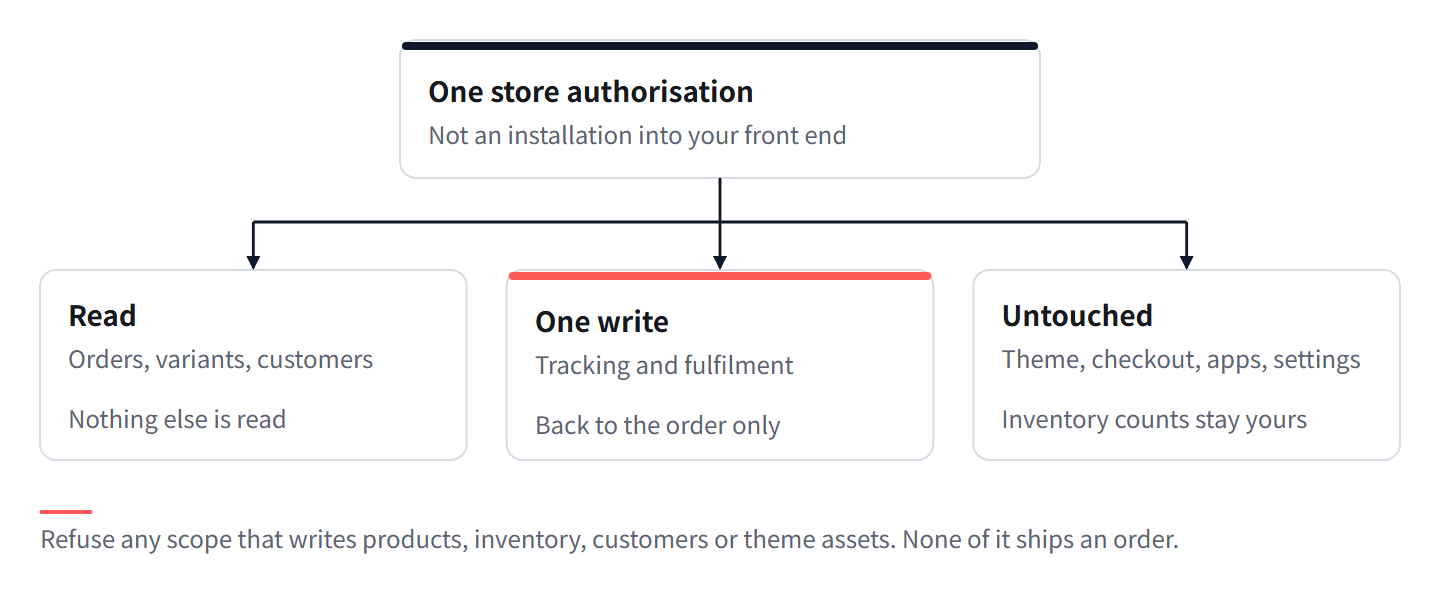
A three-order pilot across three risk levels
Do not start with your hardest order and do not start with ten of them. Start with three, chosen to cover the range of things that can go wrong.
| Pilot slot | Pick an order that is | Risk level | What it tests |
|---|---|---|---|
| Order 1 | One unit, one variant, no customisation | Low | Basic flow: sync, source, buy, measure, dispatch |
| Order 2 | Two or three units of one variant | Medium | Consolidation and the freight measurement step |
| Order 3 | One variant with an attribute that matters, such as a colour, size or printed graphic | High | Whether the variant survives the handoff intact |
Define the pass condition before you start, in writing, because a pilot without one always passes. Ours would be these four:
- All three orders dispatched with the correct variant confirmed on the first QC pass.
- Tracking present on each order in the store, and the store's own notification sent once per order.
- Zero differences in theme, checkout, app list and settings when compared against the pre-pilot state.
- No increase in support messages that can be traced to the three pilot orders.
There is no subscription and no minimum order quantity, so stopping after the pilot costs nothing and committing early saves nothing.
Worked example: how much of a week you are putting at risk
Assumptions: your store takes 40 orders a week, the pilot is 3 orders, and a failed pilot order ends in a refund rather than a dispatch.
- Pilot share of weekly volume: 3 ÷ 40 = 7.5%. That is the ceiling on what the pilot can touch.
- Worst case, all three fail: three refunded orders, which is 7.5% of a normal week's orders, on a channel you were already struggling to fulfil. Compare that with doing nothing, where the same three orders fail anyway.
- Scaling the observed failure rate: if one of the three fails, the observed failure rate is 1 ÷ 3 = 33%. Applied uncritically to 40 orders a week, that would be about 13 orders. The point of the pilot is that you fix the failure before it reaches 13, not that you accept 33%.
- Rising to a real pilot: if you wanted the failure estimate to be usable at the 40-order scale, three orders is too few to measure and exactly right to debug. Three orders finds broken cases; it does not measure rates. Do not use pilot numbers as a forecast.
Rollback: what unwinds and what does not
Know this before you start, not after something looks wrong.
| Thing | Unwind it? | How | Limit |
|---|---|---|---|
| Store authorisation | Yes | Revoke the token or uninstall the app | Orders already purchased continue, because the purchase is separate from the connection |
| A bound source on a variant | Yes | Unbind it | Affects future orders only, not ones already purchased |
| A goods purchase | Yes | Use the seven-day return window on purchases | Must be raised inside the window |
| A freight approval | No | Once dispatched, the parcel is with the carrier | Cancel before approval, not after |
| Tracking written back | Partly | The fulfilment record can be cleared | If the store already sent its completion email, that email cannot be un-sent |
| A refund already issued | No | Reverse it only through your own payment gateway | Nothing here can undo a settlement |
- Revoke authorisation first if you want to stop the flow. Artefact: no new orders enter the queue.
- Unbind any source you no longer trust. Artefact: no future order can fulfil from it.
- For anything already purchased, act inside the seven-day return window, before the freight approval.
- Accept the two irreversible steps: dispatch and a sent customer email. Make both of them late decisions, not early ones.
Note what is absent from that table. There is no "revert theme", no "restore checkout", no "reinstall apps" row, because no change was made to those surfaces in the first place.
What to tell the customer during a pilot
Usually nothing. The pilot is an internal change to how the parcel is produced, and the customer's experience of a well-run pilot is identical to a normal order: they buy, they get tracking, the parcel arrives.
| Situation | Tell them? | Why |
|---|---|---|
| Order is on track | No | Nothing has changed from their side |
| Order held one extra day for a QC re-check, still inside the promise date | No | You would be narrating your own operations |
| Promise date is now at risk | Yes | They will ask, and asking first is cheaper than answering later |
| Wrong variant caught at QC and being re-sourced | Only if it moves the date | Otherwise you are transferring your supplier problem to them |
| Substitution of an equivalent item | Yes, always | They must accept the substitute before it ships |
When you do write, use this structure, in this order: what happened in one plain sentence, what it means for the date they were given, what you are doing about it, the choice you are offering them if there is one, and when you will write again. Five parts, no marketing language, no apology paragraph.
Keep the promise date in the same unit the customer thinks in. If you quoted a handling window at checkout, refer to that window rather than to any internal stage name they have never seen.
자주 묻는 질문
Will connecting the store slow down my checkout?
No. Nothing is added to the storefront or to the checkout path. The connection reads order data and writes tracking back, and neither touches rendering.
Can I disconnect at any time?
Yes. Revoking the authorisation stops new orders entering. Anything already purchased continues through the warehouse, because the purchase is not dependent on the connection.
Does anything get written to my products or inventory?
No. Product and variant data is read to identify what was sold. Inventory counts in your store are not modified.
What if a pilot order goes wrong?
Unbind the source and use the return window on the purchase if the goods are wrong. If the parcel has already been dispatched, that step is irreversible, which is why the decision point sits at the freight approval.
How many orders should a pilot cover?
Three, across three risk levels, with the pass condition written before the first one. Three is enough to find broken cases and too few to measure a failure rate, so do not treat pilot results as a forecast.
이번 주 할 일
- Write down the permission list with grant or refuse beside each line, then connect and compare the granted scope against it.
- Pick three orders: one single unit, one multi unit, one with an attribute that matters.
- Write the four pass conditions on paper before the first order is sourced, and hold yourself to them.
- Check theme, checkout, app list and settings after the third dispatch, and keep the comparison as evidence for the next decision.
Lovegodrop 소싱 팀이 작성하고 관리합니다. 이 페이지는 어떻게 작성되고 검증되는가.
이미 판매한 주문 하나로 시작하세요
Shopify 또는 WooCommerce 스토어를 연결하고 결제된 주문 하나를 선택하면, 확정하기 전에 해당 주문의 소싱 및 배송 견적을 확인할 수 있습니다.