SHOPIFY VIDEO TUTORIAL
How Lovegodrop Works with Shopify
Learn how to connect your Shopify store, source and import products, synchronize customer orders, approve payments and manage fulfillment with Lovegodrop.
Connect Shopify or WooCommerce. Import products from Chinese marketplaces, find a source for an existing order, or bind an existing product to a marketplace source.
Product, order and tracking workflows for both platforms.


 1688
1688
 Taobao
 Weidian
 Yupoo
Yupoo
 Xianyu
 Poizon
There are two main workflows. Existing store orders support self-service source binding first, with manual sourcing available when no suitable match is found.
Search Lovegodrop, review the sourcing price, edit the listing, and push it to your connected store.
Synchronize the order, then choose how the product source should be obtained.
Watch the tutorial for your ecommerce platform, then use the detailed guide below whenever you need to review a specific step.
Learn how to connect your Shopify store, source and import products, synchronize customer orders, approve payments and manage fulfillment with Lovegodrop.
Learn how to connect WooCommerce, source and import products, synchronize customer orders, approve payments and manage fulfillment with Lovegodrop.
Two additional English-language videos are available below.
Choose whether the order uses a product imported through Lovegodrop or a product already sold in your store.
Choose your platform and follow the screenshots. Complete the final account binding before importing products or synchronizing orders.
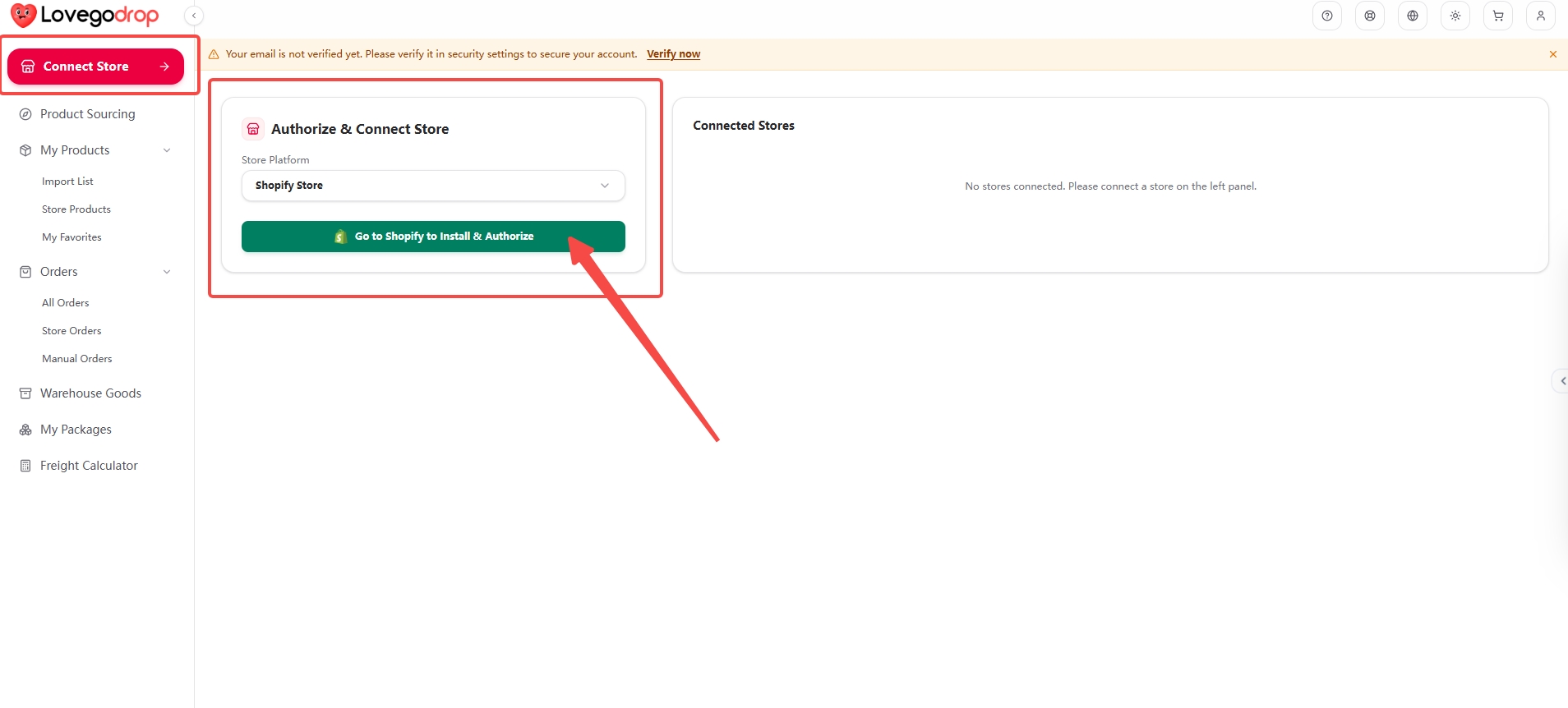
Open Connect Store. Select Shopify Store under Store Platform, then click Go to Shopify to Install & Authorize.
 Open full screenshot ↗Open full screenshot ↗
The complete screen keeps the navigation and original annotations visible. The close-up helps you read the action. Either image opens the unchanged original for zooming and scrolling.
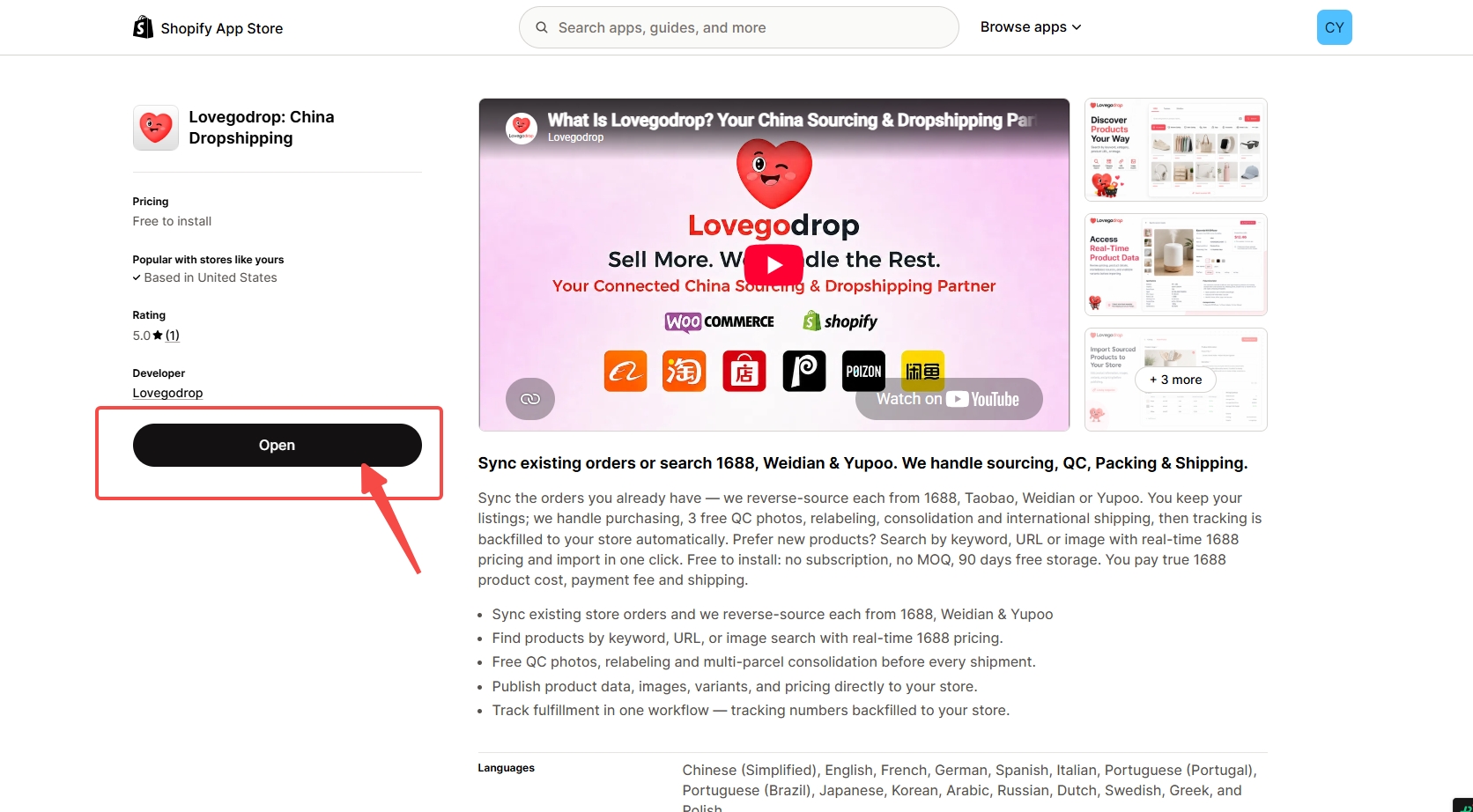
Confirm you are using the correct Shopify store. If the app is not installed, choose Install and complete Shopify’s permission prompts. If it is already installed, the button may say Open, as shown here.
 Open full screenshot ↗Open full screenshot ↗
The complete screen keeps the navigation and original annotations visible. The close-up helps you read the action. Either image opens the unchanged original for zooming and scrolling.
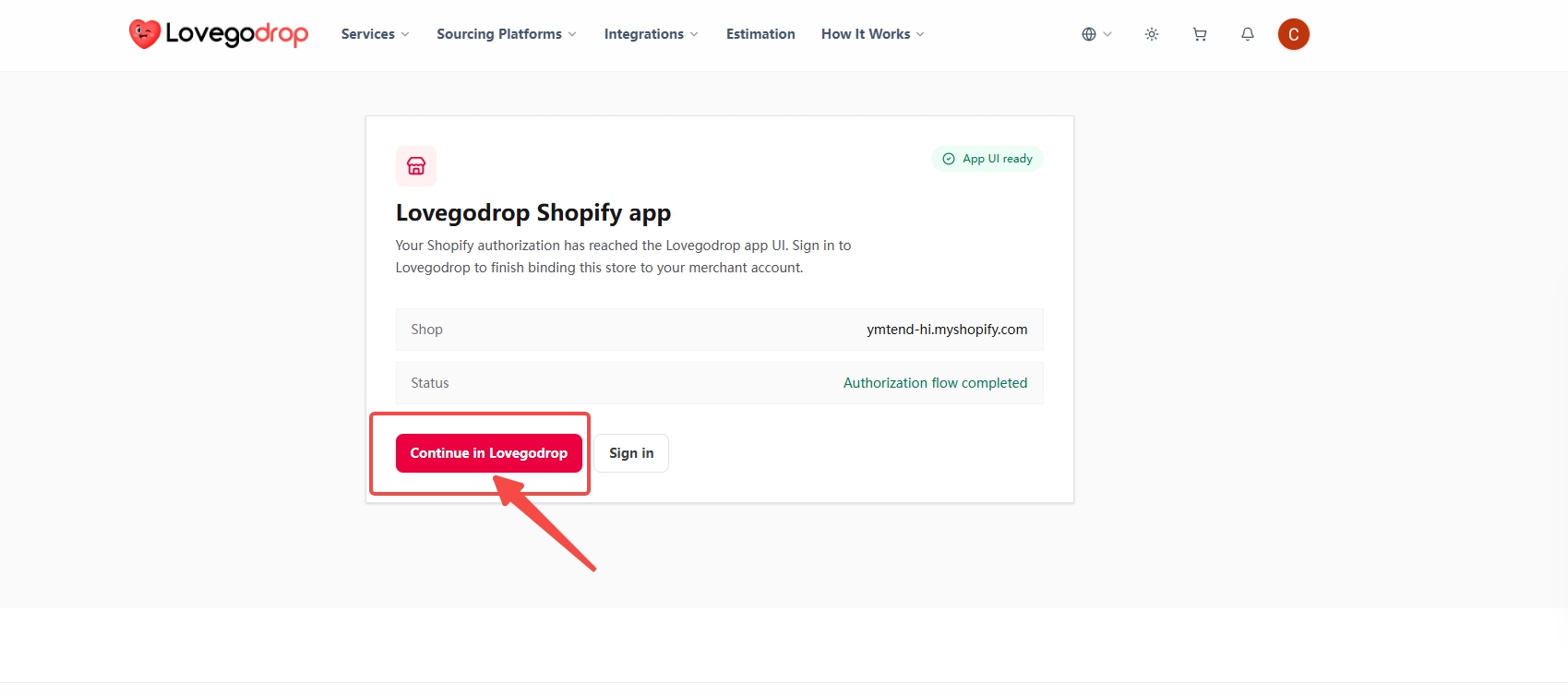
On the Lovegodrop Shopify app page, check the shop domain and click Continue in Lovegodrop. Sign in to the Lovegodrop account that should own this connection if requested.
 Open full screenshot ↗Open full screenshot ↗
The complete screen keeps the navigation and original annotations visible. The close-up helps you read the action. Either image opens the unchanged original for zooming and scrolling.
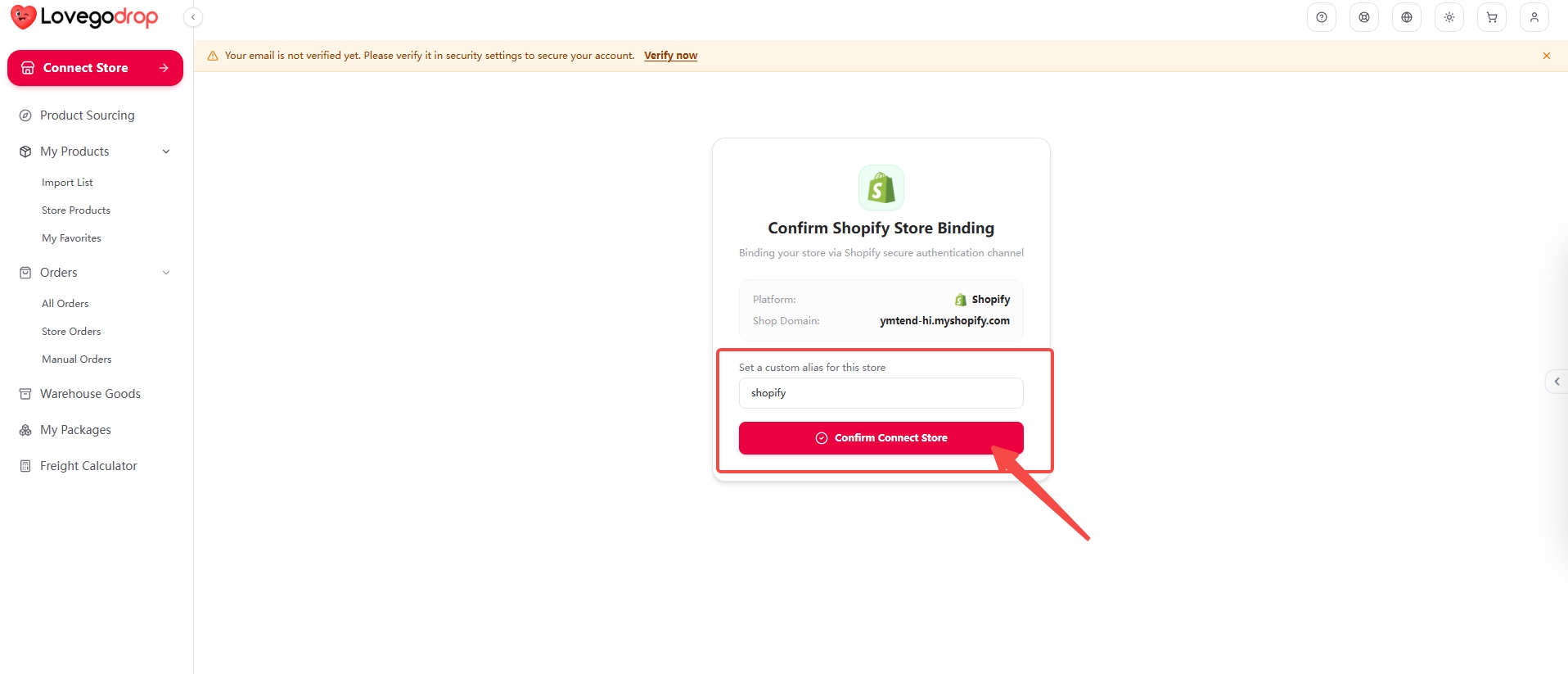
On Confirm Shopify Store Binding, verify Shop Domain, set a recognizable store alias, then click Confirm Connect Store.
 Open full screenshot ↗Open full screenshot ↗
The complete screen keeps the navigation and original annotations visible. The close-up helps you read the action. Either image opens the unchanged original for zooming and scrolling.
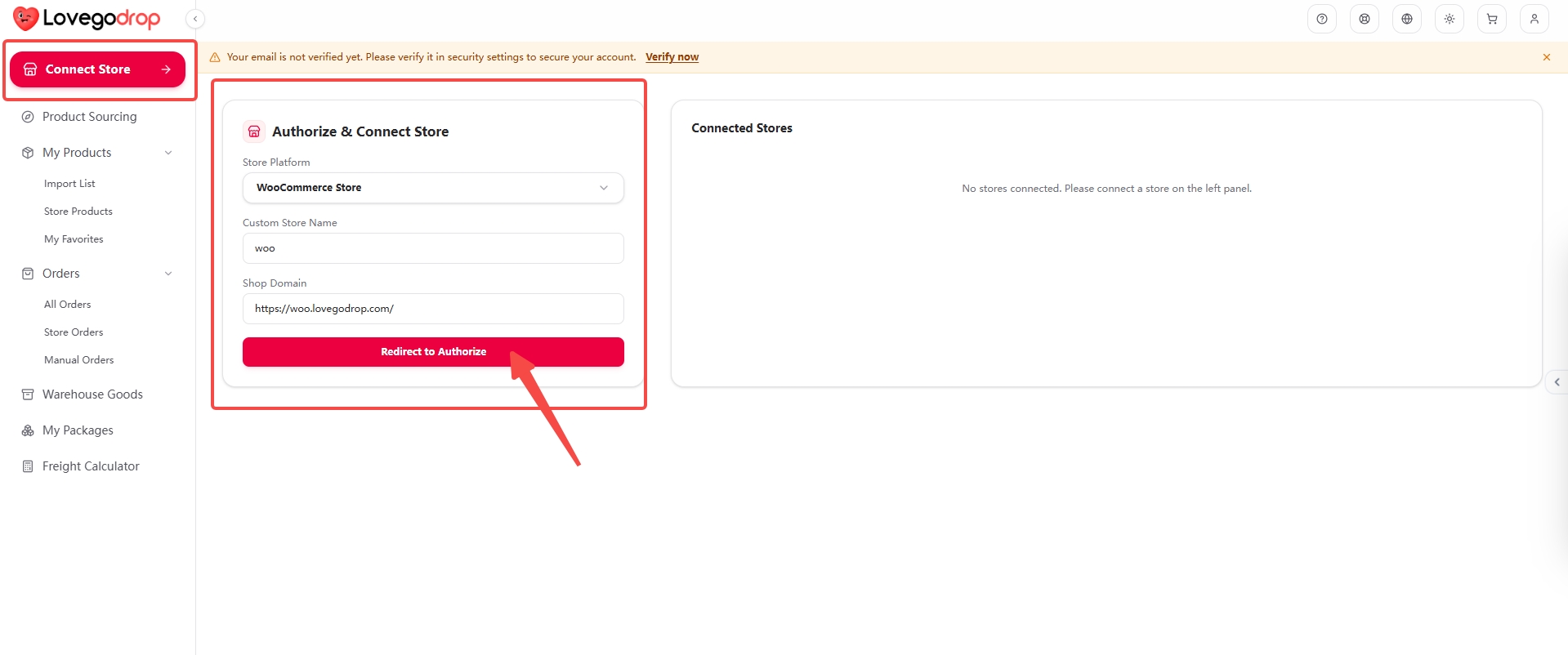
Open Connect Store and choose WooCommerce Store. Enter a Custom Store Name and the canonical HTTPS Shop Domain of your own WooCommerce store, then click Redirect to Authorize. Do not copy the demonstration domain.
 Open full screenshot ↗Open full screenshot ↗
The complete screen keeps the navigation and original annotations visible. The close-up helps you read the action. Either image opens the unchanged original for zooming and scrolling.
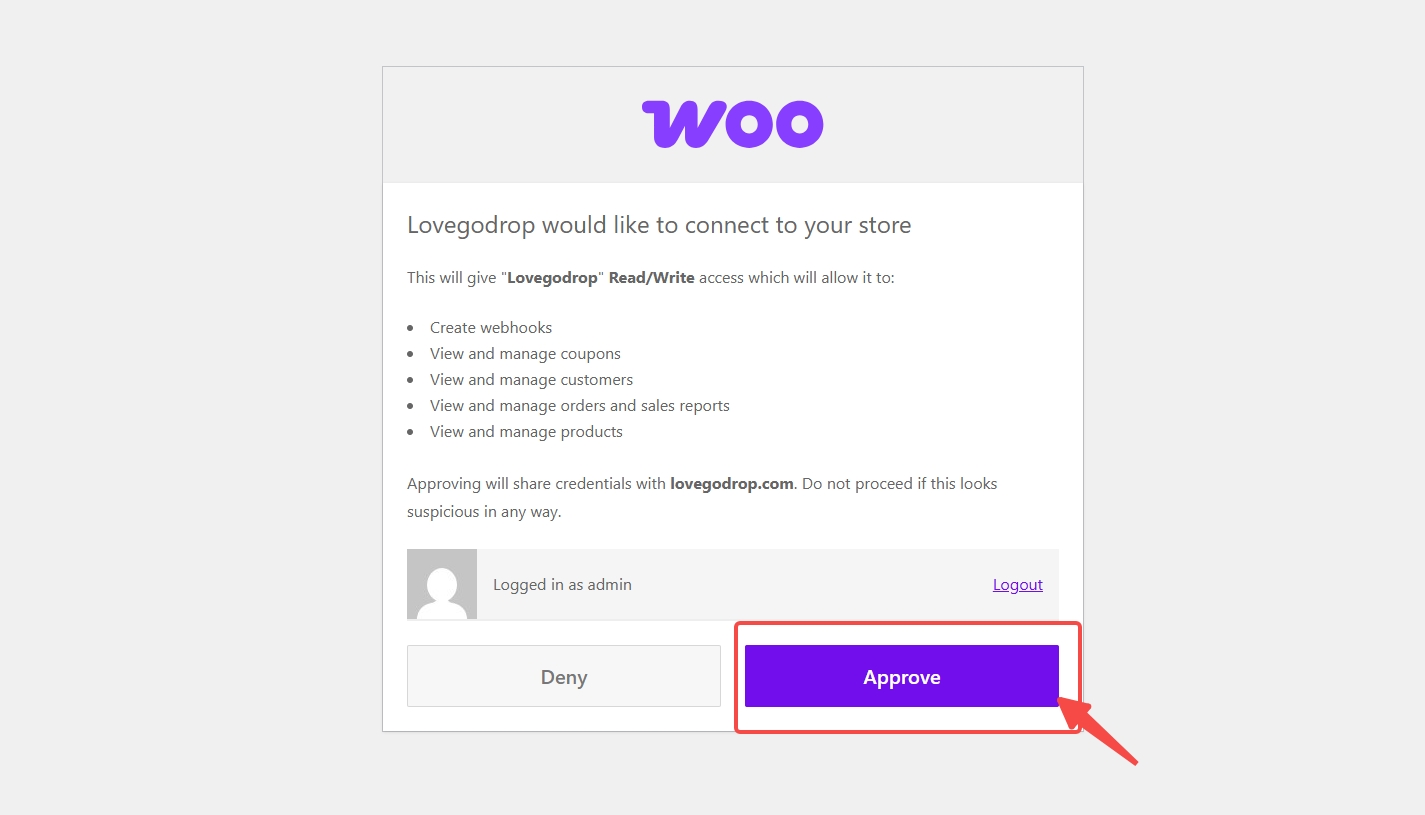
Check that this is your store and that the app request is from Lovegodrop. Read the requested Read/Write permissions. If correct, click Approve and allow the browser to return to Lovegodrop.
 Open full screenshot ↗Open full screenshot ↗
The complete screen keeps the navigation and original annotations visible. The close-up helps you read the action. Either image opens the unchanged original for zooming and scrolling.
Return to Connect Store → Connected Stores and check that the correct store is listed. A Shopify authorization-success message alone is not proof that account binding is finished.
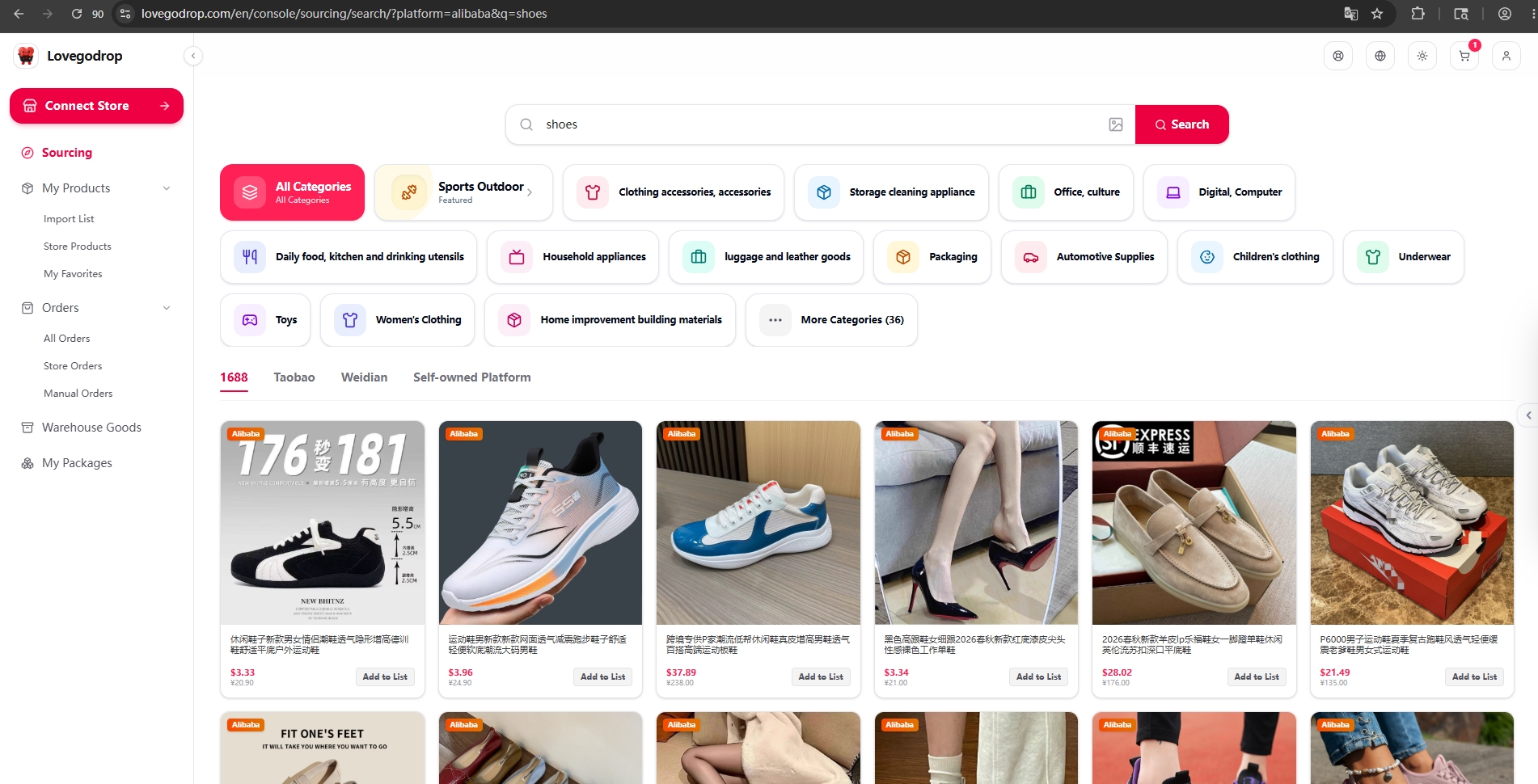
Open Sourcing. Search by keyword, category, product URL, or image, select a marketplace, review the displayed product price, and click Add to List.
Open My Products → Import List. Confirm the source marketplace, sourcing cost, variants, and source URL before editing or pushing the product.
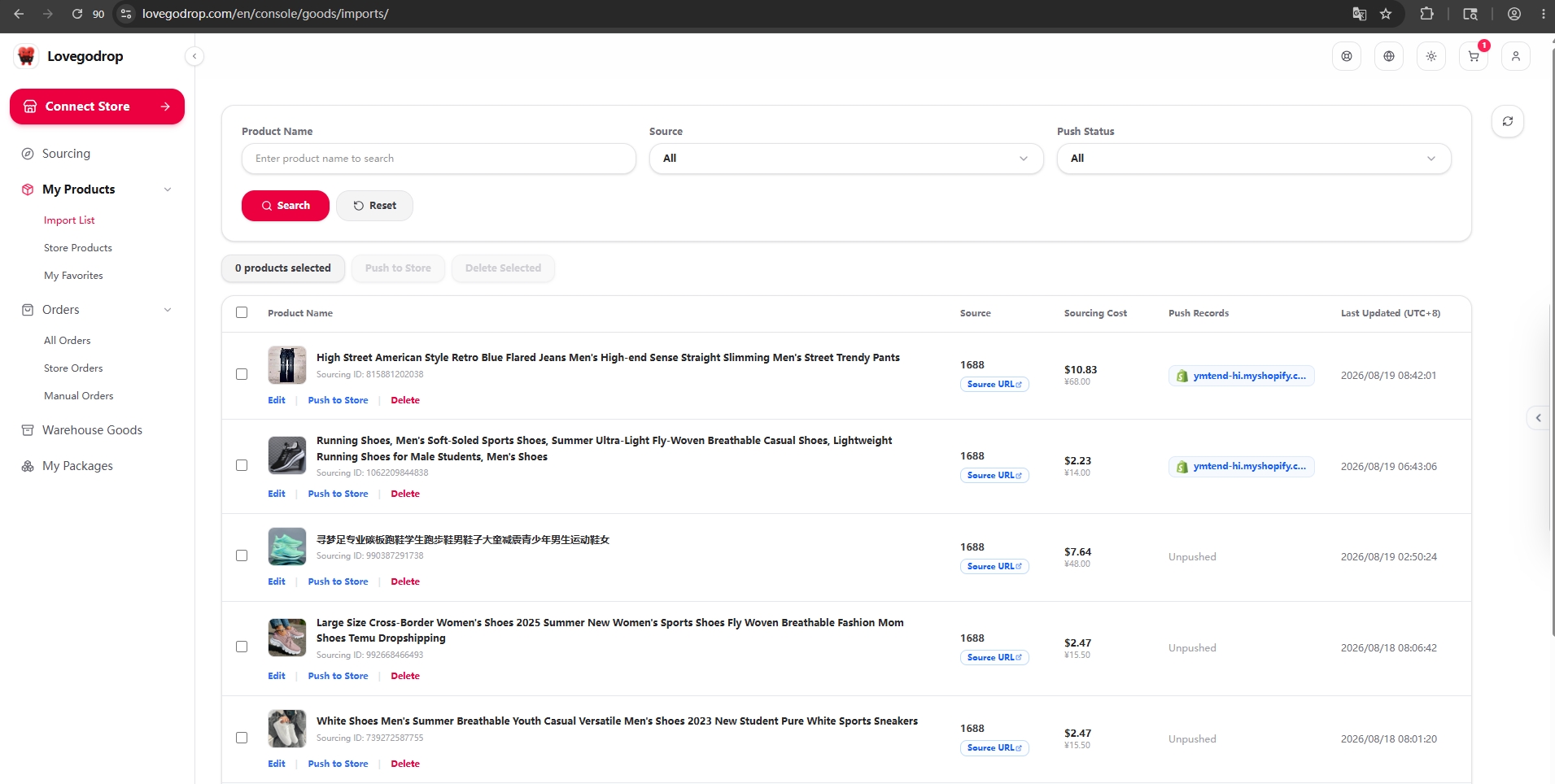
Edit the title, variants, selling price, and available stock, then save and select Push to Store. The sourcing cost is written to the corresponding product or variant cost field.
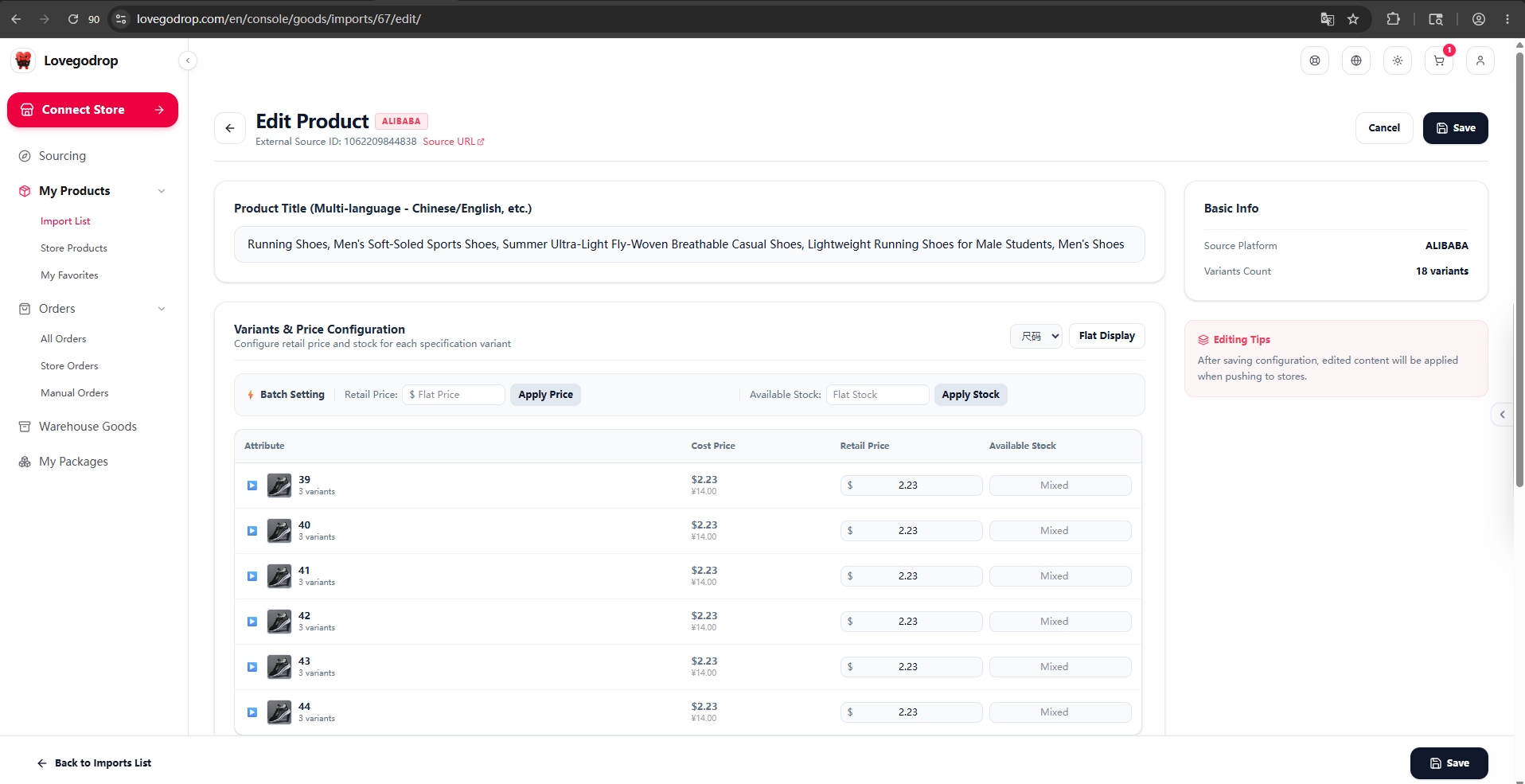
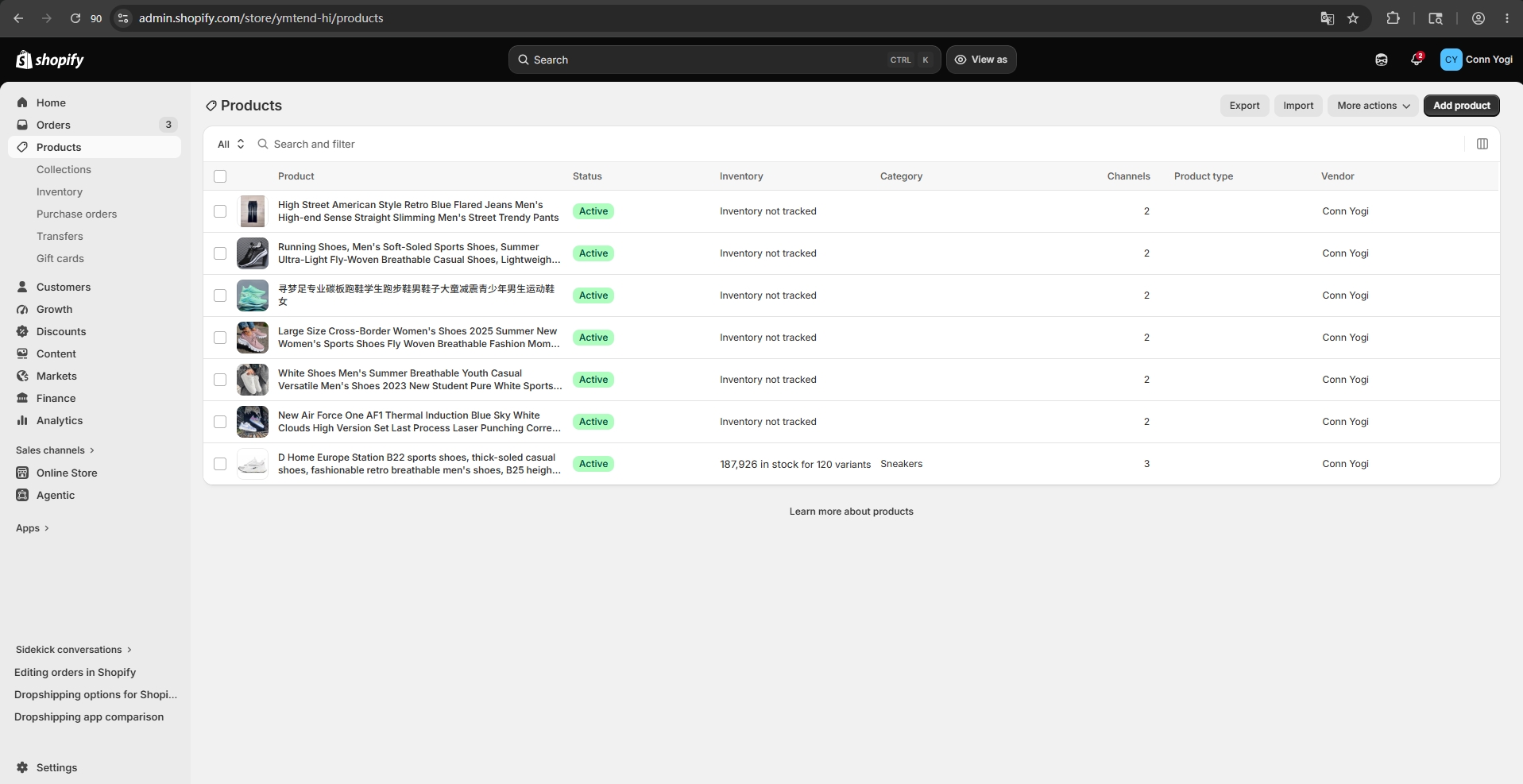
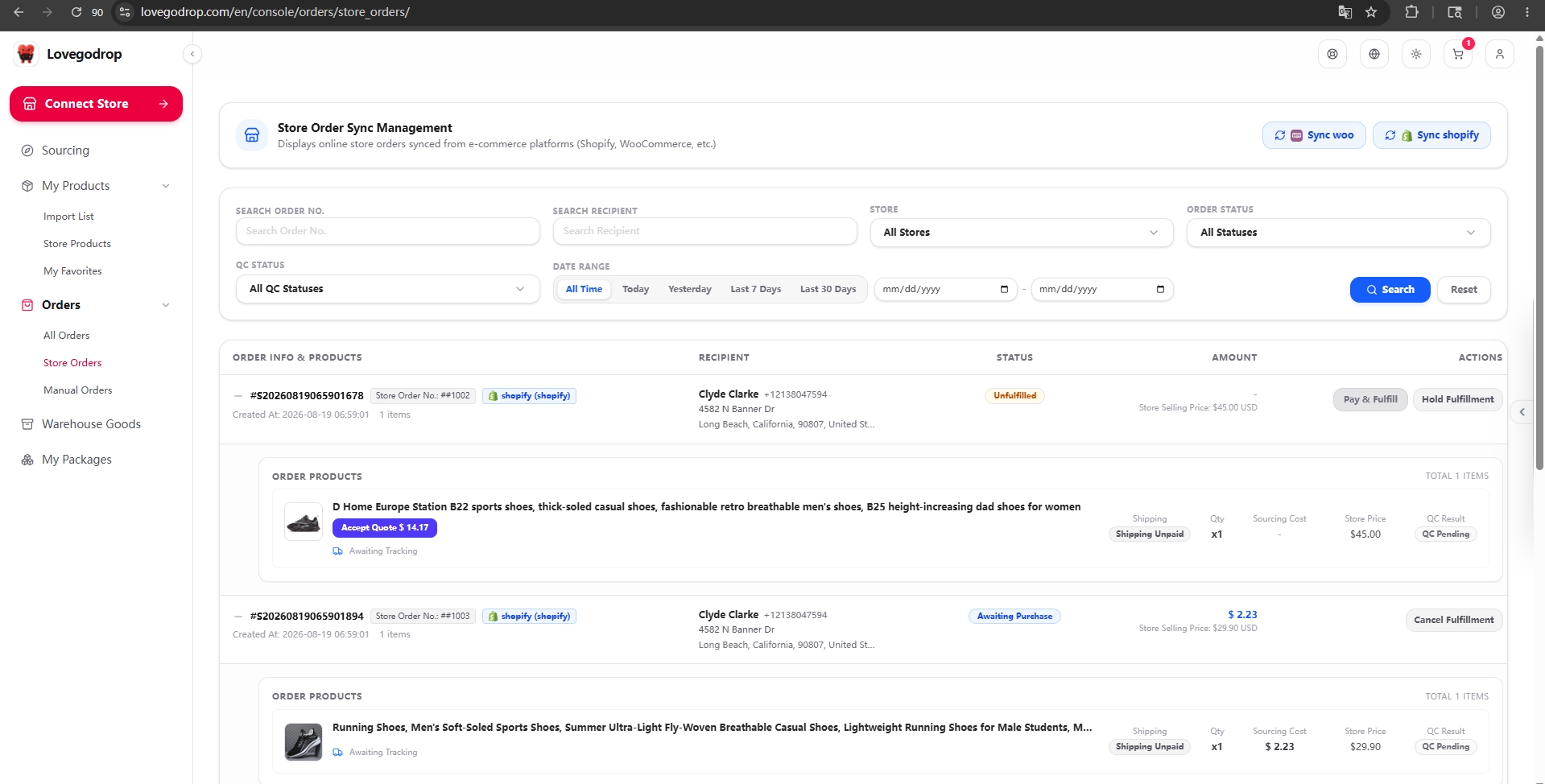
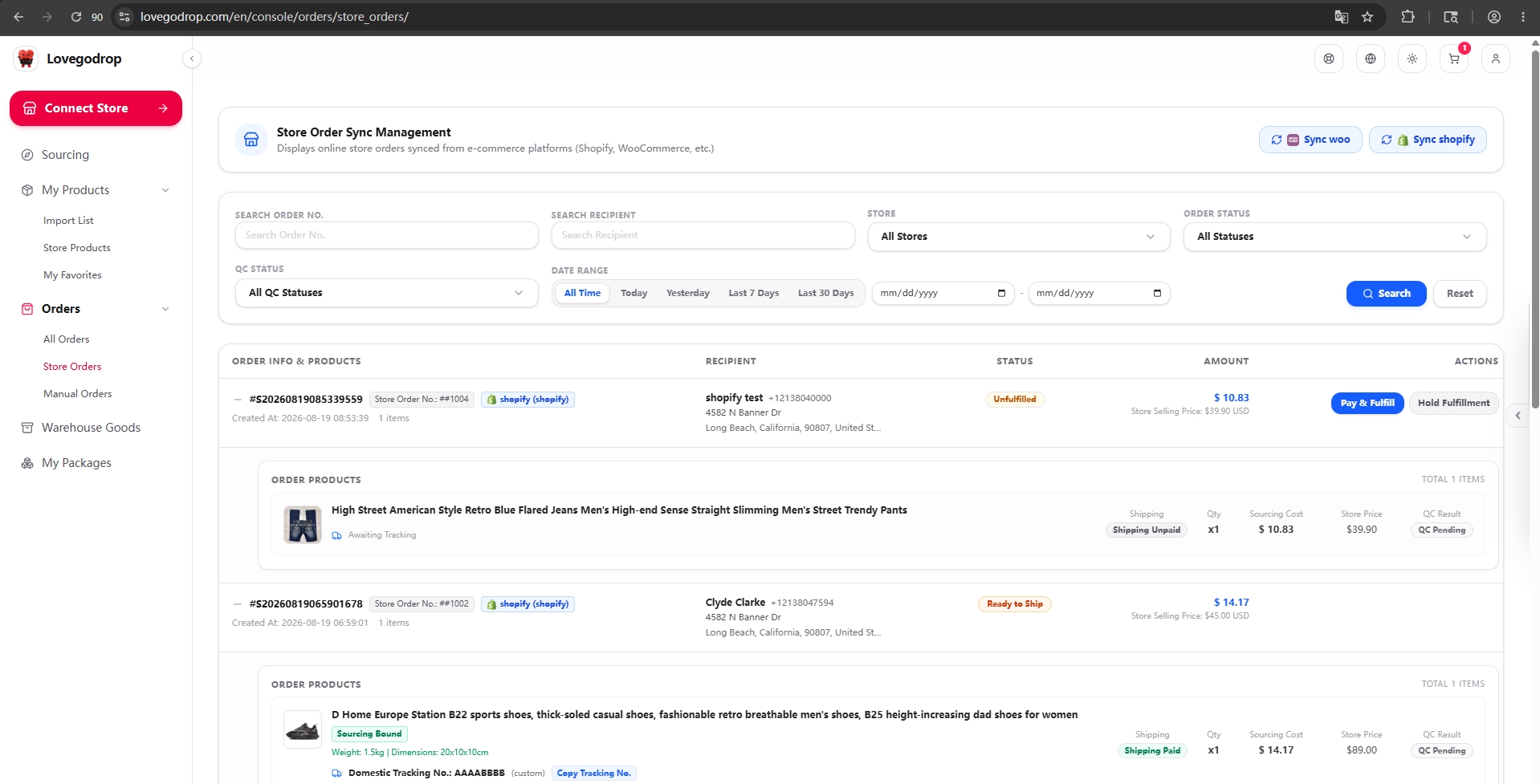
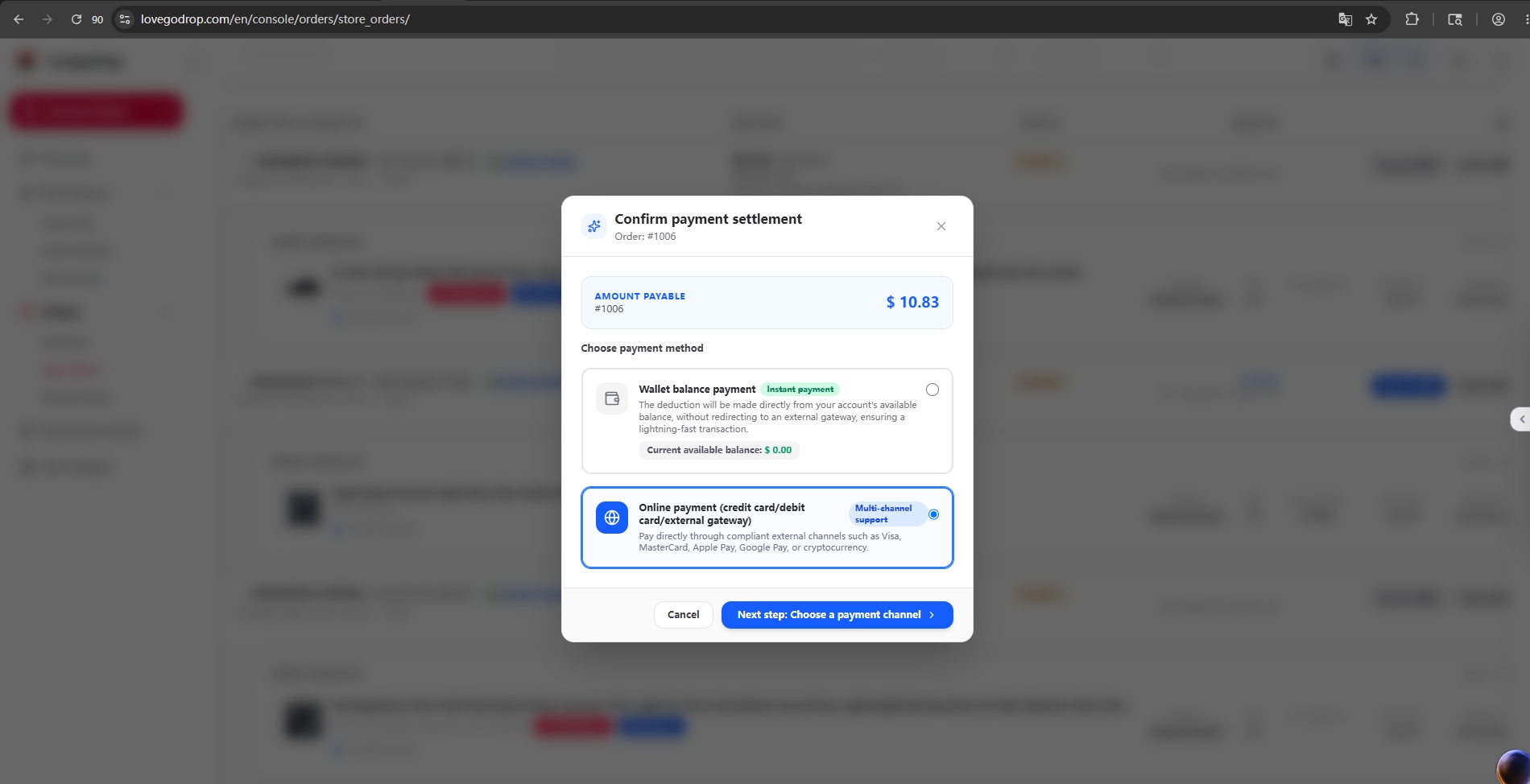
When a customer orders an imported item, synchronize the order in Orders → Store Orders. Review the product sourcing cost and select Pay & Fulfill. Choose a payment method and confirm payment.
After the applicable product-cost or combined-quote payment is successfully completed, Lovegodrop purchases the product from the supplier. When the product arrives at the Lovegodrop warehouse, the QC team inspects it and uploads the quality-control photos to the corresponding Lovegodrop order page. Before shipment, the merchant can verify the received quantity, actual weight, package dimensions and QC photos, then confirm whether the product may proceed to international shipping.
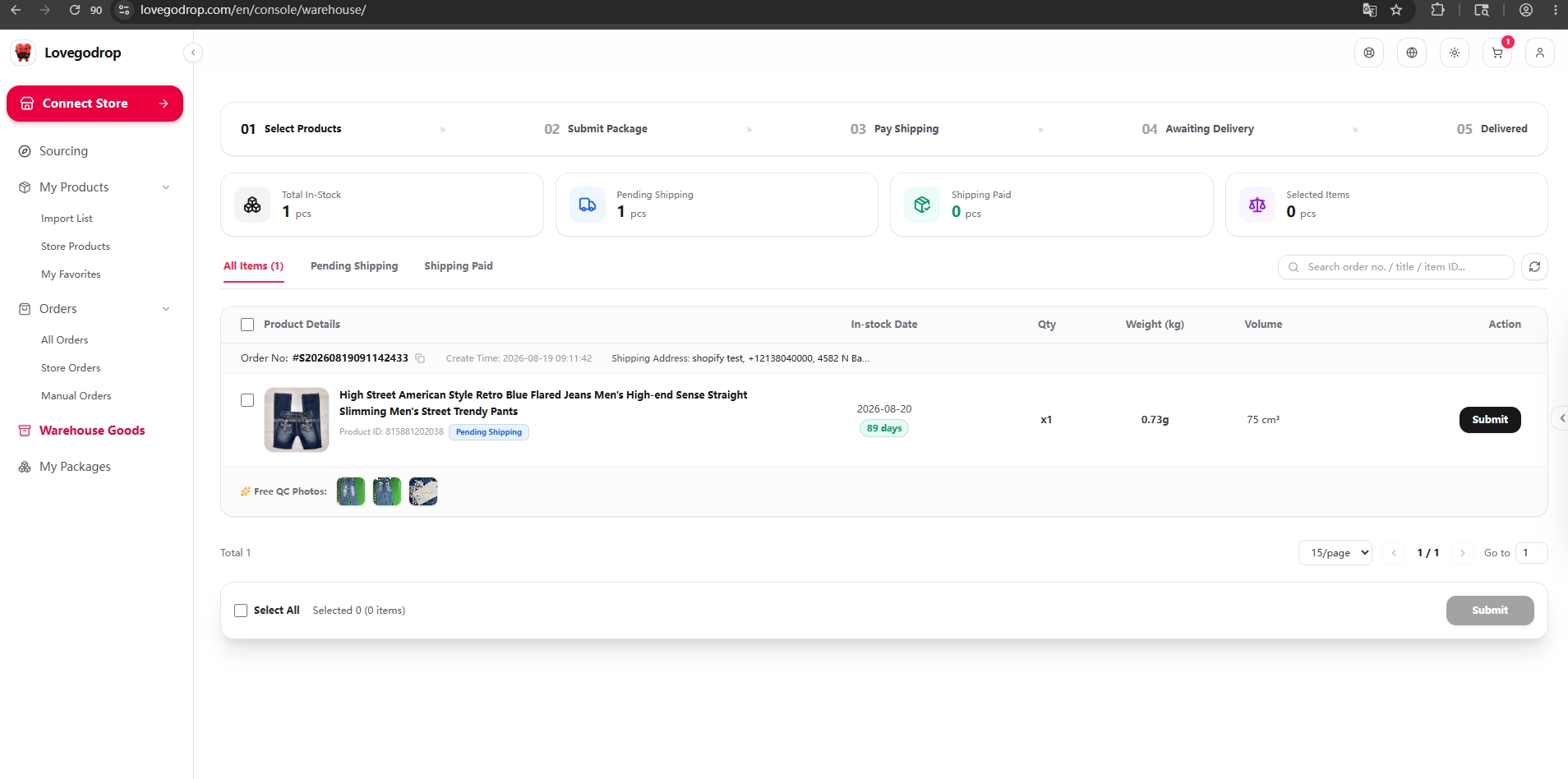
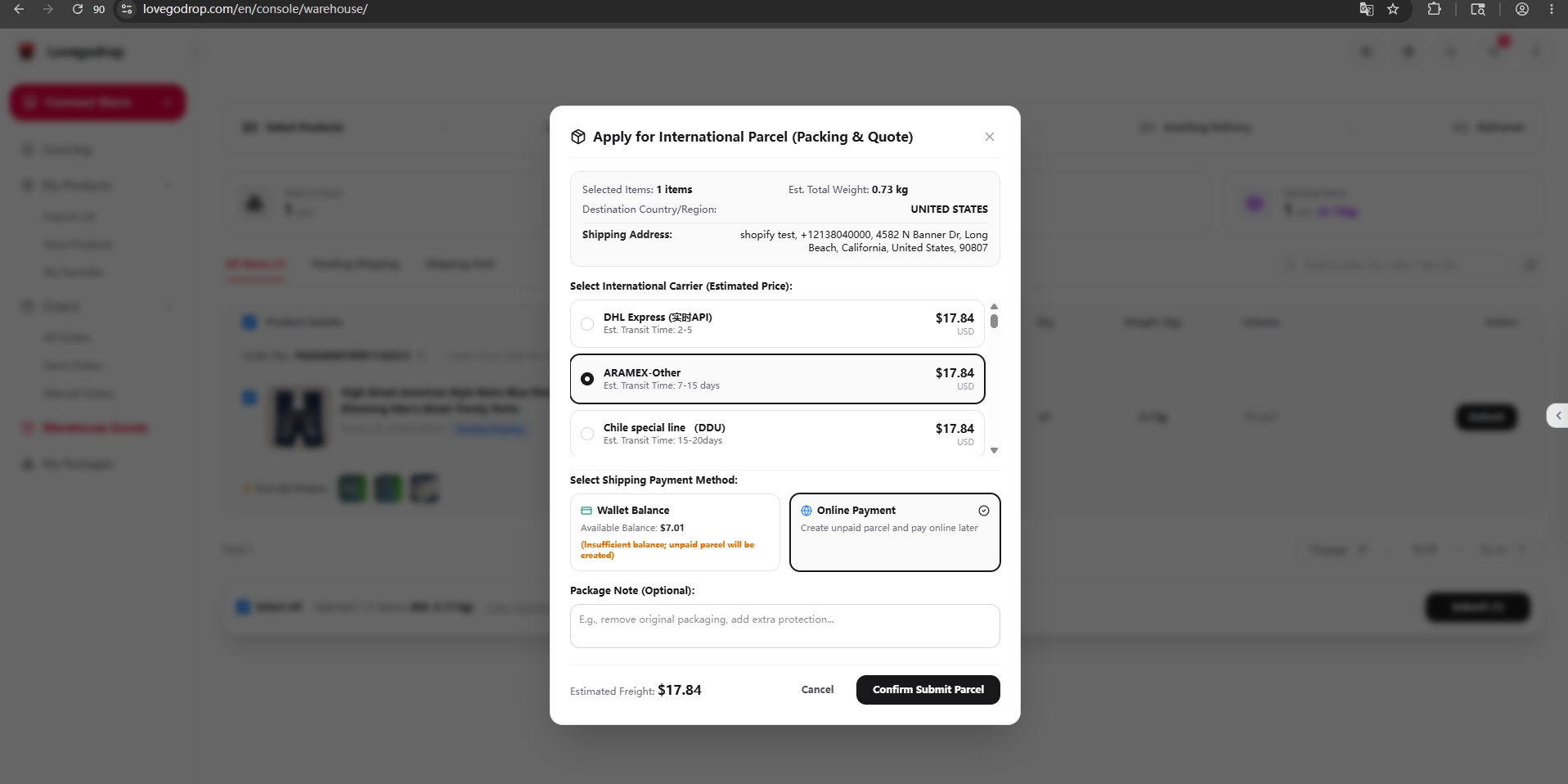
After approving the received item, select it in Warehouse Goods, submit a parcel, compare available routes and transit times, and confirm the shipping payment.
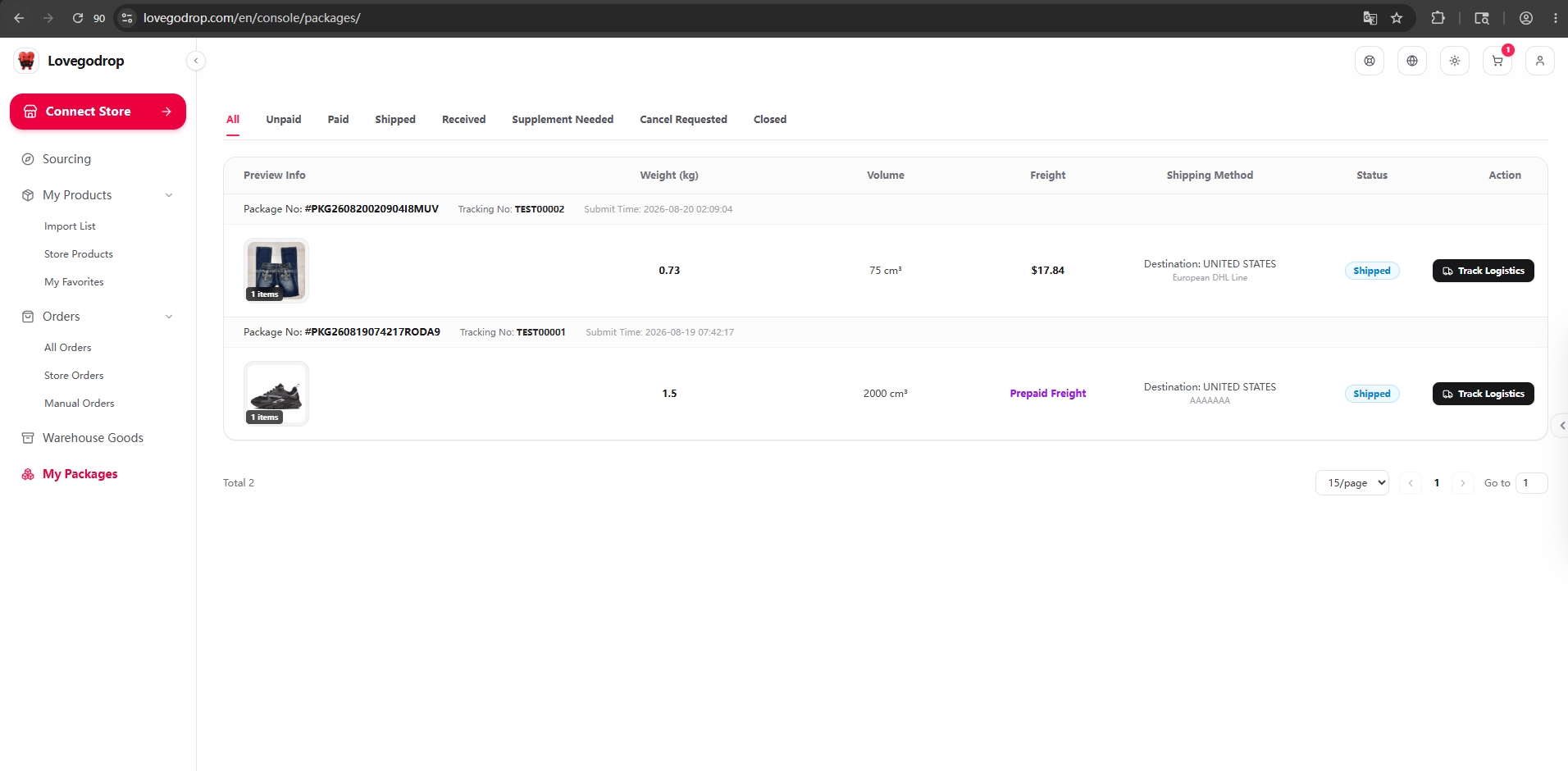
After shipping payment, Lovegodrop dispatches the parcel through the merchant-selected carrier. The carrier and tracking number appear in My Packages and are synchronized back to the connected store, where the order can be marked fulfilled.
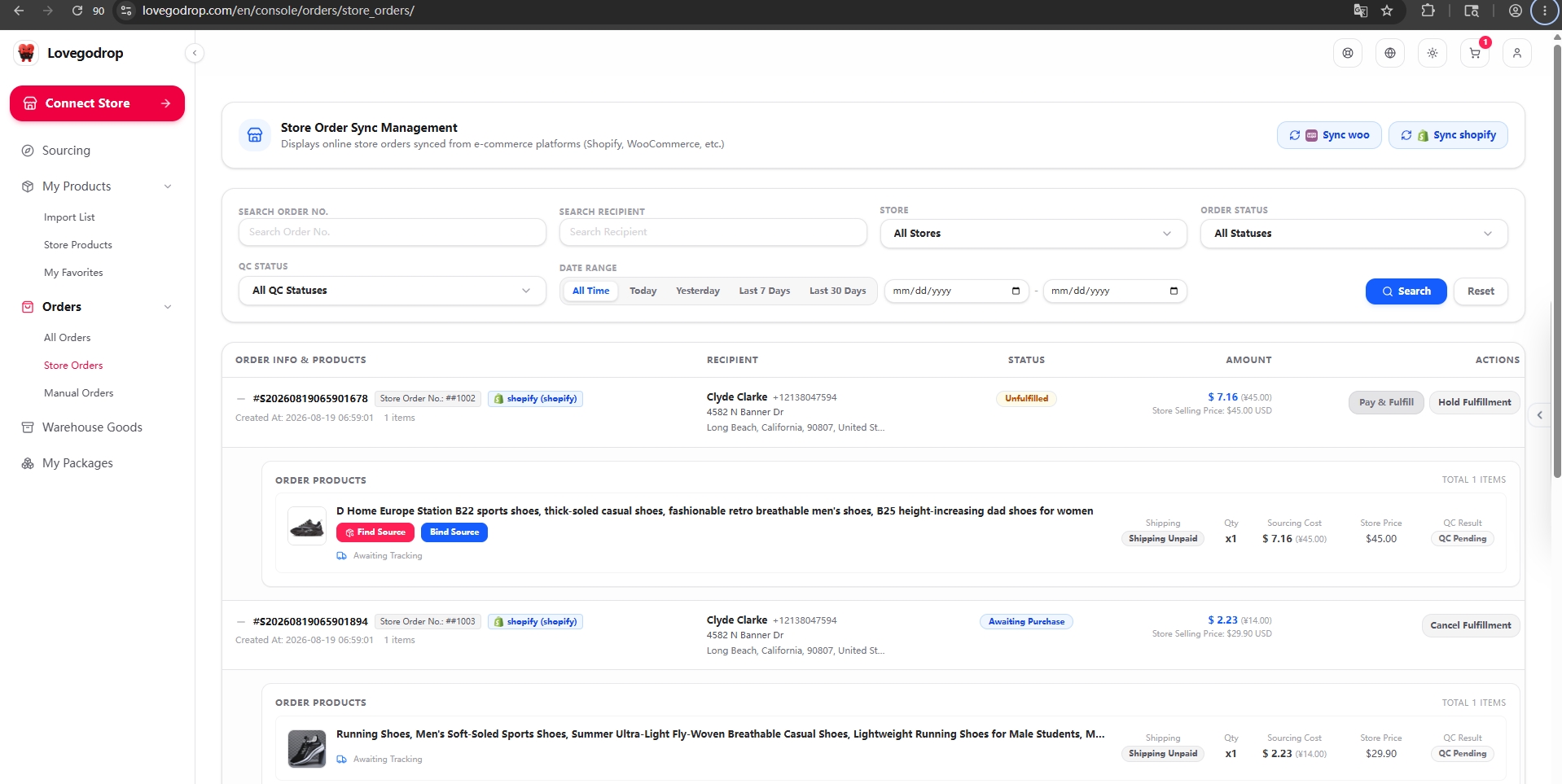
Connect your Shopify or WooCommerce store from Connect Store and complete the authorization. Then open Orders → Store Orders and click Sync Shopify or Sync Woo. Verify that the customer order, recipient information, product, variant and quantity have synchronized correctly before choosing a sourcing option.
Open Connect Store. Select Shopify Store under Store Platform, then click Go to Shopify to Install & Authorize.
Open full screenshot ↗Open full screenshot ↗The complete screen keeps the navigation and original annotations visible. The close-up helps you read the action. Either image opens the unchanged original for zooming and scrolling.
Confirm you are using the correct Shopify store. If the app is not installed, choose Install and complete Shopify’s permission prompts. If it is already installed, the button may say Open, as shown here.
Open full screenshot ↗Open full screenshot ↗The complete screen keeps the navigation and original annotations visible. The close-up helps you read the action. Either image opens the unchanged original for zooming and scrolling.
On the Lovegodrop Shopify app page, check the shop domain and click Continue in Lovegodrop. Sign in to the Lovegodrop account that should own this connection if requested.
Open full screenshot ↗Open full screenshot ↗The complete screen keeps the navigation and original annotations visible. The close-up helps you read the action. Either image opens the unchanged original for zooming and scrolling.
On Confirm Shopify Store Binding, verify Shop Domain, set a recognizable store alias, then click Confirm Connect Store.
Open full screenshot ↗Open full screenshot ↗The complete screen keeps the navigation and original annotations visible. The close-up helps you read the action. Either image opens the unchanged original for zooming and scrolling.
Open Connect Store and choose WooCommerce Store. Enter a Custom Store Name and the canonical HTTPS Shop Domain of your own WooCommerce store, then click Redirect to Authorize. Do not copy the demonstration domain.
Open full screenshot ↗Open full screenshot ↗The complete screen keeps the navigation and original annotations visible. The close-up helps you read the action. Either image opens the unchanged original for zooming and scrolling.
Check that this is your store and that the app request is from Lovegodrop. Read the requested Read/Write permissions. If correct, click Approve and allow the browser to return to Lovegodrop.
Open full screenshot ↗Open full screenshot ↗The complete screen keeps the navigation and original annotations visible. The close-up helps you read the action. Either image opens the unchanged original for zooming and scrolling.
Return to Connect Store → Connected Stores and check that the correct store is listed. A Shopify authorization-success message alone is not proof that account binding is finished.
Use Sync Orders for that store, or Orders → Store Orders → Sync Shopify / Sync Woo. No eligible orders can mean an empty list; it does not by itself mean the connection failed.
Start with Bind Source. If no suitable product or variant can be found, switch to Find Source for manual sourcing assistance.
On the synchronized store-order item, click Bind Source. Search Lovegodrop-connected 1688, Taobao or Weidian sources and bind the correct supplier product and variant to the order item.
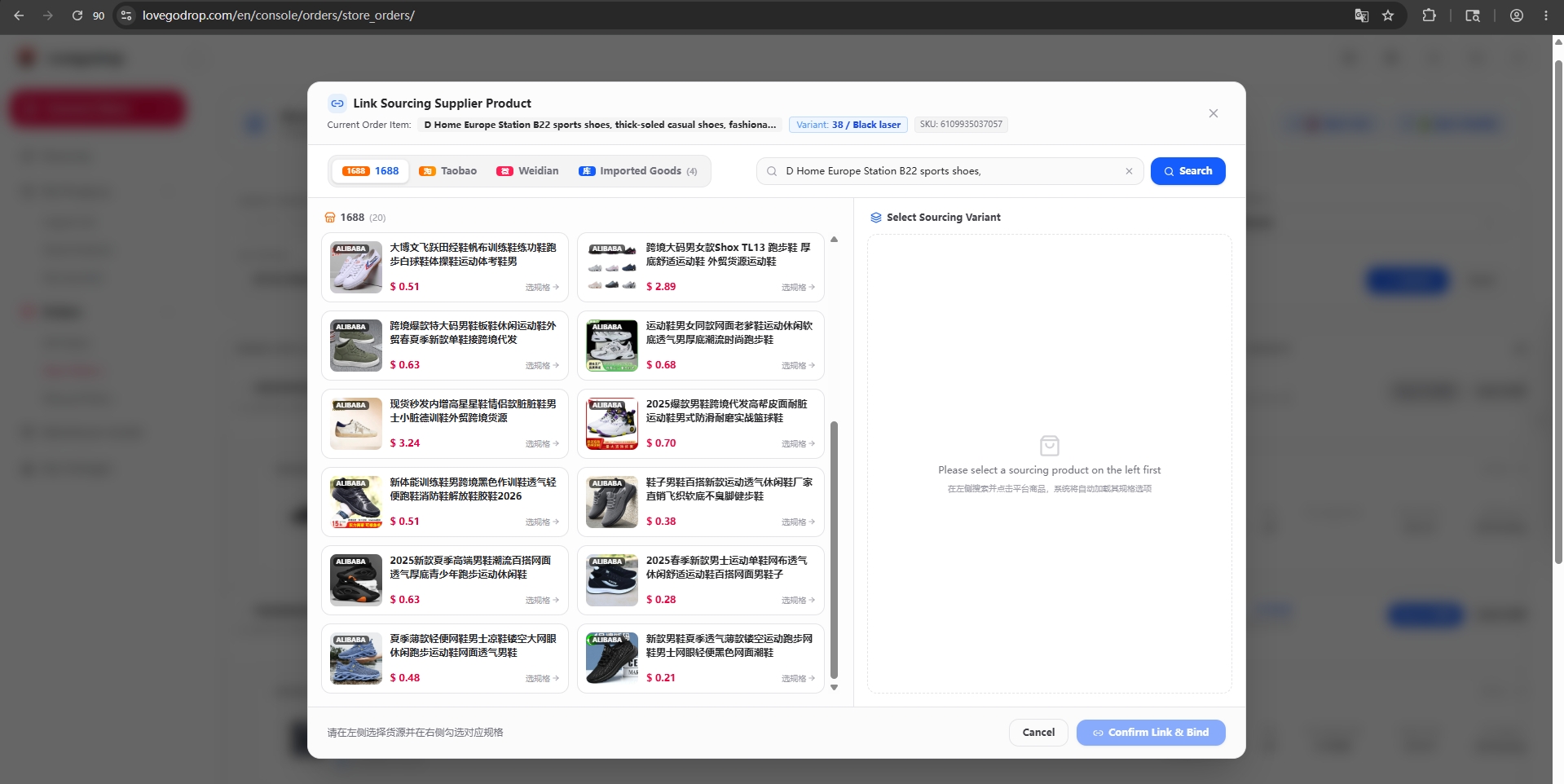
The initial bound-source quote excludes international shipping. Review and approve the product cost; any processing fee is disclosed before checkout.
After the applicable product-cost or combined-quote payment is successfully completed, Lovegodrop purchases the product from the supplier. When the product arrives at the Lovegodrop warehouse, the QC team inspects it and uploads the quality-control photos to the corresponding Lovegodrop order page. Before shipment, the merchant can verify the received quantity, actual weight, package dimensions and QC photos, then confirm whether the product may proceed to international shipping.
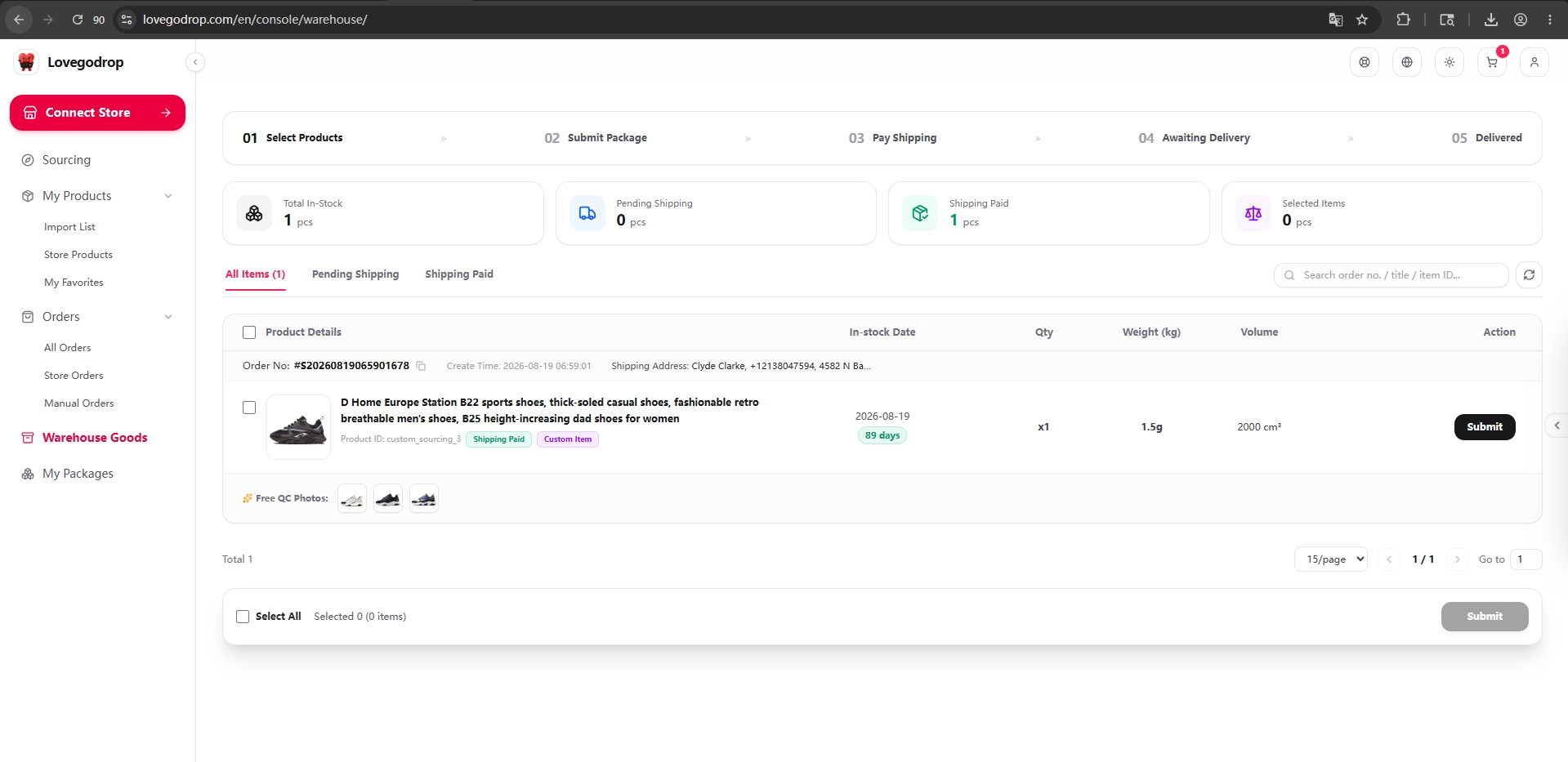
Submit the parcel, compare routes and confirm the separate international shipping payment.
Lovegodrop dispatches the parcel and returns tracking to Shopify or WooCommerce.
For an existing store order, start with Bind Source. Use Find Source only when a suitable product or variant cannot be found.
| Cost and approval | Workflow A: Imported product | Workflow B1: Bind Source | Workflow B2: Find Source |
|---|---|---|---|
| Product purchasing cost | Paid before purchasing | Paid after binding | Included in combined quote |
| International shipping | Paid separately after QC | Paid separately after QC | Included in combined quote |
| Merchant payment stages | Two | Two | One |
| Second shipping payment | Required | Required | Not required |
| Payment-processing fee | Disclosed before each checkout | Disclosed before each checkout | Excluded from quote; disclosed at checkout |
| Automatic merchant charge | No | No | No |
Every product, combined quote, or shipping payment requires merchant confirmation.
Carrier transportation and shipping-label cost are included in the confirmed shipping amount.
Both main workflows support one-piece purchasing and dropshipping.
Yes. Synchronize the existing Shopify or WooCommerce order, try Bind Source first, and use Find Source if no suitable match is available.
It depends. A Bind Source product quote excludes shipping, which is selected and paid after QC. A Find Source quote includes product purchasing and international shipping.
Imported Product and Bind Source use two stages: product purchasing first, then international shipping after warehouse receiving and QC. Find Source uses one combined product-and-shipping quote.
Yes. After warehouse receiving, Lovegodrop QC staff inspect the product and upload photos. The merchant can verify quantity, weight, dimensions and QC photos before confirming shipment.
No. The merchant must explicitly review and confirm each applicable payment.
After dispatch, carrier and tracking information are available in My Packages and synchronized back to the connected store.