
Cumpra pedidos Shopify que já vendeu
Um pedido Shopify já pago contém variante, quantidade e destino. É um briefing de sourcing mais preciso do que qualquer link de produto.
Pontos-chave
- A sold order states the variant, quantity, destination and deadline, which a product link never does.
- Three routes exist: A import for catalogue building, B1 bind source when you own the supply link, B2 find source when you do not.
- Goods and freight are two separate payments, approved at two different moments, and never merged into one number.
- Freight is quoted after the warehouse weighs and measures the parcel, and any excess paid in advance is returned.
- QC photos reach you before the shipping payment, which is the last moment you can cancel without a dispatched parcel.
Why a paid order is a tighter brief than a product link
Two Shopify orders have been sitting in Unfulfilled for four days because the supplier behind them stopped answering. The product page still looks fine and the checkout still takes money, so the store is quietly selling something you cannot ship. Each day those orders sit, the outcome slides from a late parcel to a refund, and from a refund to a dispute.
A product link cannot fix that. The order can.
A link tells you what an item looks like in the abstract. A paid order tells you what one named buyer is waiting for, and it carries four things no listing page carries: the exact variant, the quantity, the destination, and the deadline your store implied at checkout.
| What the sourcing brief needs | From a product link | From a paid Shopify order |
|---|---|---|
| Variant | Every variant the listing offers, and you must guess | The one variant this buyer paid for |
| Quantity | Unknown until you decide | Stated on the line item |
| Destination | Unknown | Full shipping address on the order |
| Deadline | None | Set by whatever your store promised at checkout |
| Cost of a wrong answer | A wasted search | A refund, a support thread, a chargeback risk |
The variant is where most of the damage happens. A listing shows that a product exists in four colours and two sizes; the order says which one this customer bought. Sourcing the right product in the wrong variant produces a parcel that is worse than nothing, because now you have paid for goods, paid for freight, and still have to refund.
Quantity changes the shape of the problem. One unit is a single purchase with a single stock risk. Twenty units of the same variant is a stock-availability question, a consolidation question, and a question about whether one supplier holds that many today.
Destination and deadline close it out. Freight depends on route and on chargeable weight, and both depend on where the parcel is going. An order already carries the address, so the freight question can be answered against a real destination instead of a hypothetical one.
The three routes: A, B1, B2, and which one your order needs
There are three ways an item enters the system. Only two of them start from an order you already sold, and picking the wrong one costs you a day.
Route A is import. You pick a product on one of the six supported marketplaces (1688, Taobao, Weidian, Yupoo, Xianyu, Dewu) and push it into your store as a draft or a live product. This is the catalogue path, and it is the right one when nothing has sold yet.
Route B1 is bind source. You already own the supply link for a variant that is already selling. You bind that link to the existing store variant, and the existing order then fulfils from it.
Route B2 is find source. You have no link at all. You hand over a photo, a keyword, or the product page of another site, candidates come back from the supported marketplaces, and you choose one.
| Route | You start with | What it produces | Correct when | Wrong when |
|---|---|---|---|---|
| A · Import | A marketplace product you want to sell | A draft or live product in the store | You are building a catalogue before any sale | An order is already paid and waiting |
| B1 · Bind Source | A working supply link for the variant | The link attached to the store variant, order fulfilled from it | The item already sells and you know the source | The link is dead or the variant changed |
| B2 · Find Source | No link: a photo, keyword, or other site's product page | Candidate list from the six marketplaces, you pick one | The supplier failed, or the listing was removed | The item is contract-manufactured to your own spec |
Two constraints are worth stating before you choose, because they are real and they shape the timeline.
The automated line handles keyword, link and image search, and it returns candidates and goods pricing. A freight quote requires the human sourcing line, because freight depends on packed dimensions and on the route, and neither is known until someone has looked at the actual goods. That is not a defect in the automation; it is the reason the freight number is trustworthy when it arrives.
- Decide which route you are on by asking one question: do I already hold a supply link for this exact variant? Yes means B1, no means B2, and no sale yet means A.
- Write the variant down in one line before you start, including the attribute your store calls it, not the attribute the marketplace calls it.
- Send one message with everything attached: the variant line, the quantity, the destination country, and any photo you have. Artefact: a single sourcing request that does not need a follow-up question.
From sold order to dispatch: four steps and what you see at each
The flow is short, and each step ends in something you can see and act on.
| Step | What happens | What you see | Your decision |
|---|---|---|---|
| 1 · Sync | The store is authorised once and orders come across | Order with line items, variant, quantity, address | Which orders to work on |
| 2 · Source | Route B1 or B2 produces a goods quote and candidates | Goods pricing, candidate list, stock answer | Approve the goods payment or walk away |
| 3 · Buy and receive | The purchase is placed at the marketplace and ships to the warehouse | Order marked as purchasing, then received | Wait, or cancel inside the return window |
| 4 · Measure and dispatch | Parcel is weighed, measured, photographed, then quoted for freight | Three QC photos per item, freight quote, route options | Approve freight, then tracking is written back |
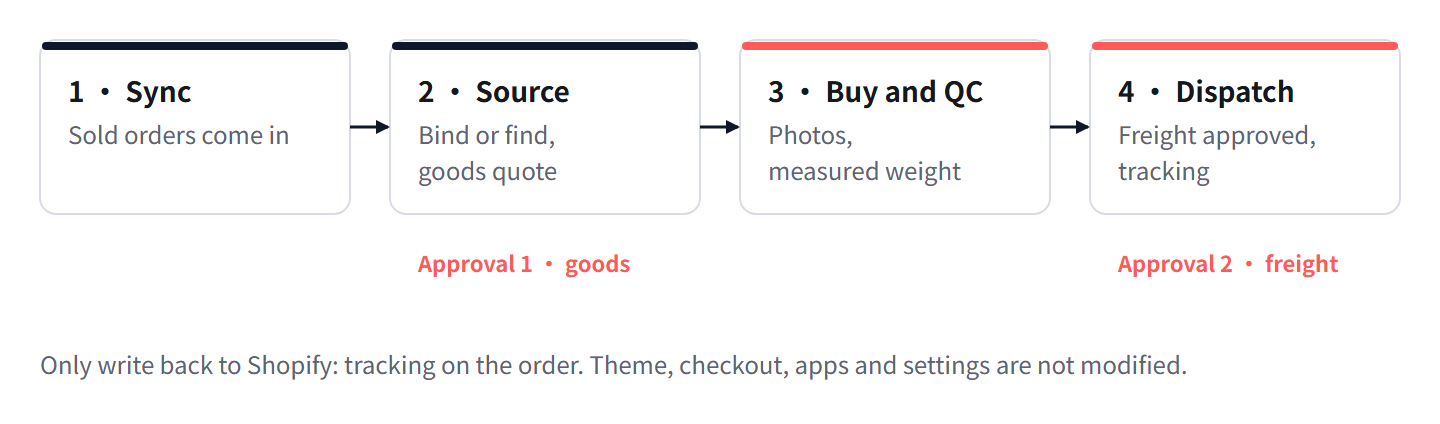
Step one is a one-time authorisation. After that, orders that already exist in the store are visible with their line items, which means no manual re-typing of addresses and no spreadsheet of variants.
Step two is where the two B routes diverge, and it ends in a goods quote you either approve or decline. Nothing is purchased without that approval.
Step three moves money for the first time. The purchase is placed at the marketplace and the item travels to the warehouse. There is a seven-day return window on purchases, which matters in step four.
Step four is the one most merchants get wrong the first time. The parcel is weighed and measured, three QC photos per item are attached to the order, and only then is a freight quote issued against the measured chargeable weight and the route you choose. You approve it, and tracking is written back to the Shopify order.
Why goods and freight are two separate payments
There are two payments and they are not merged. This is deliberate, and it protects you in a specific way.
The goods payment starts the purchase at the marketplace. Its basis is the listing price of the item times the quantity. You approve it before anything is bought.
The shipping payment happens later, after the goods have reached the warehouse and been weighed and measured. Its basis is the route plus the measured chargeable weight. You approve it before anything is dispatched.
| Goods payment | Shipping payment | |
|---|---|---|
| When | Before the purchase is placed | After the goods arrive and are measured |
| Basis | Marketplace listing price × quantity | Route × measured chargeable weight |
| Produced by | Automated search line returns goods pricing | Human sourcing line, because freight depends on packed size and route |
| Approving it means | Buy this item from this source | Send this parcel on this route |
| Not approving it means | Nothing is purchased | The parcel stays in the warehouse, inside the return window |
Bundling the two into one figure would require guessing the packed weight and dimensions before anyone has seen the goods. Marketplace listings routinely understate both. A single bundled number is therefore either wrong in your favour, which you will not notice, or wrong against you, which you will notice as a surcharge after the customer has already paid.
Splitting them means the freight number is computed from a parcel that exists and has been measured. It also gives you a decision point in the middle: you can approve the purchase, see what actually arrived in the QC photos, and then decide whether to pay to ship it.
Freight is measured at the warehouse, not estimated from the listing
Chargeable weight is the greater of two numbers: the weight on the scale, and the volumetric weight derived from the packed dimensions. Volumetric weight is length × width × height divided by a divisor, and the divisor is route specific. The quote states which divisor applies, and it is worth reading, because it decides which of the two numbers wins.
This is why the measurement happens at the warehouse. A listing that says an item is light and small is frequently describing the item bare, or describing it in a soft bag rather than a carton. The warehouse sees the outer carton after packing, which is what the carrier actually bills on.
Because freight may have been paid in advance against the listing estimate, the measurement settles it.
| Outcome | What it means | What happens |
|---|---|---|
| The amount paid in advance exceeds the measured amount | The listing estimate was too generous | The difference is returned |
| Measured amount exceeds what was paid in advance | The parcel is larger or heavier than the listing suggested | You approve the difference before dispatch, or cancel |
| The two match | The listing was accurate | Nothing to settle |
The third row is the rare one. Expect the first or the second, and treat the second as a prompt to look at the QC photos before you approve, not after.
Worked example: two units, chargeable weight, and settling the advance payment
Assumptions, stated so you can audit every number. Two units of one variant in one order. Each unit is listed at 380 g with listed dimensions 24 × 18 × 10 cm. The warehouse consolidates both into one outer carton that measures 30 × 20 × 12 cm, and the scale reads 850 g including packing material. The route divisor is 6000.
- Basis for the advance payment, from the listing. Two units, unconsolidated: 2 × (24 × 18 × 10) = 8,640 cm³. Divided by 6000 gives 1.44 kg volumetric. The listed scale weight for two units is 2 × 0.38 = 0.76 kg. Chargeable weight on the estimate is the greater of the two, so 1.44 kg. That is the basis the advance payment was taken on.
- Measured basis, from the warehouse. Consolidated carton: 30 × 20 × 12 = 7,200 cm³. Divided by 6000 gives 1.20 kg volumetric. The scale reads 0.85 kg. Chargeable weight is the greater of the two, so 1.20 kg.
- What consolidation changed. Had the two units gone as separate parcels, chargeable weight would have been 1.44 kg. Consolidated, it is 1.20 kg. The reduction is 0.24 kg, which is 16.7% of the unconsolidated figure.
- The billing ratio. You are billed on 1.20 kg against a scale weight of 0.85 kg, a ratio of 1.41. Freight is levied on about 41% more weight than the scale shows, because the carton is mostly air.
- The settlement. The advance payment was taken on 1.44 kg, the measured chargeable weight is 1.20 kg, and the difference is 0.24 kg, which is 16.7% of the advance basis. Freight within a weight band scales with chargeable weight, so that is the share of the advance freight payment returned, less any minimum charge the route applies.
- Sensitivity check on the divisor. If the route divisor is 5000 instead of 6000, the measured volumetric weight is 7,200 ÷ 5000 = 1.44 kg, the advance payment settles exactly, and nothing is returned. The divisor is worth confirming before you read a refund as a discount.
The structural point is that none of these numbers came from a guess. Every one of them came from an object sitting on a scale in a warehouse, and the only input the listing contributed was the thing that turned out to be wrong.
QC photos arrive before the shipping payment: your last clean exit
Three QC photos per item are attached to the order before the freight quote is issued. That ordering is the whole design. It puts the last moment at which you can say no before the last moment at which money moves.
Read them for four things, in this order: the variant you ordered, the condition of the surface that the customer will see first, the completeness of what was supposed to be in the box, and anything printed on the item or the packaging.
| What the photos show | Action | Why |
|---|---|---|
| Correct variant, acceptable condition | Approve the freight quote | Nothing to gain by waiting |
| Wrong variant | Reject, use the purchase return window | Shipping it guarantees a return at the destination |
| Right item, visible damage | Reject and ask for a substitute unit | A damaged unit becomes a refund plus two freight legs |
| Ambiguous, needs a closer look | Hold and request an extra angle | Holding costs storage days; 90 days of storage is included, so holding is cheap |
Holding is underrated. Storage is included for 90 days, so the cost of waiting one more day for a better photo is close to zero, while the cost of shipping a wrong variant is the full round trip plus a refund.
What you cannot do after approving freight is quietly change your mind. Once the parcel is dispatched, the options narrow to whatever the carrier and the destination allow, which is not a fulfilment decision any more.
What changes in your store, and what does not
This is the question that stops most pilots, so here it is surface by surface.
| Store surface | Status | Detail |
|---|---|---|
| Theme files | Not touched | No template or asset edits |
| Checkout | Not touched | Payment and checkout flow unchanged |
| Apps | Not touched | No app is installed over your existing stack |
| Settings and shipping zones | Not touched | Rates, zones and tax configuration stay as they are |
| Product and variant records | Read | Used to identify what was sold |
| Customer records | Read | Name and address come across with the order |
| Order records | Read, then one write | Tracking and fulfilment written back |
| Inventory counts | Not touched | No stock numbers are pushed into the store |
The Shopify app is free to install, and installing it is an authorisation, not a migration. One write happens: tracking is written back to the order so the store can notify the customer in its own voice.
Which orders this route is wrong for
Three order types look like candidates and are not.
| Order type | Why this route is wrong | What to do instead |
|---|---|---|
| Pre-order with a future release date | There is no stock to confirm today, and confirming it weeks early produces a stale answer | Hold the order and start sourcing inside the window where the item is actually buyable |
| Custom manufacturing to your own specification | No marketplace listing exists to buy; the item has to be made | Use a manufacturing workflow with samples and a production agreement |
| Multi-vendor bundles | No single listing corresponds to the bundle, so one variant cannot carry the whole order | Source the components separately and consolidate, which is a different approval shape |
The bundle case deserves one clarification. Bundles are workable; they are just not a one-click variant binding. Each component is sourced on its own, they meet at the warehouse, and consolidation merges them into one parcel. That is a legitimate path, but the goods quote arrives per component rather than per order, so do not start a bundle here expecting a single line.
Perguntas frequentes
Do I have to import the product into my store before it can be fulfilled?
No. Import is route A, and it is the catalogue path. If the order already exists, route B1 or B2 starts from the order and skips the import step entirely.
How long does the goods quote take versus the freight quote?
Goods pricing comes from the automated line, which handles keyword, link and image search. Freight needs the human sourcing line, because it depends on packed dimensions and route, so it arrives after the goods are measured at the warehouse.
What happens if the measured freight is higher than what I paid in advance?
You are asked to approve the difference before dispatch. That approval is the decision point: approve and ship, or decline and use the seven-day return window on the purchase.
Can I cancel after the QC photos?
Yes, and that is the last clean point to do it. Before freight approval the goods are in the warehouse and the purchase return window applies. After dispatch, the options are whatever the carrier allows at the destination.
Will this change my theme, checkout, apps or settings?
No. Those surfaces are not modified. Order data is read, and tracking is written back to the order. Inventory numbers in your store are left alone.
O que fazer esta semana
- Open your oldest Unfulfilled order and write down its variant, quantity and destination country on one line. That line is the brief.
- Decide your route by asking whether you already hold a supply link for that exact variant. Link means B1, no link means B2.
- Send one message containing the variant line, the quantity and any photo you have, then wait for the goods quote before approving anything.
- When the QC photos arrive, check the variant first and the condition second, and hold rather than approve if either is unclear.
Escrito e mantido pela equipa de sourcing da Lovegodrop. Como estas páginas são escritas e verificadas.
Comece por um pedido que já vendeu
Ligue uma loja Shopify ou WooCommerce, escolha um pedido já pago e veja o orçamento de sourcing e de envio para esse pedido específico antes de assumir qualquer compromisso.