
Encontrar uma fonte a partir de uma foto: o que funciona e o que não
Uma pesquisa por imagem é tão boa quanto o recorte que lhe dá. Três entradas, uma tabela de pontuação, um passo de verificação e uma regra de paragem de 30 minutos.
Pontos-chave
- Prepare the image first: plain background, no model, no text overlay, whole item, distinctive hardware visible.
- Score every candidate out of ten and pick at eight or above; keep the runner-up as a fallback.
- Verify against a specification you wrote down, never against a photograph that looks right.
- Two failed input changes is the signal to change the input, not to retry the same one.
- Stop automated search at 30 minutes and hand the package to a human sourcer.
Three ways into a search, and when each one finds the item
A customer sent you a photograph of something they saw somewhere and asked whether you sell it. You have no link, no supplier, and no product name that works in a search box. What you do in the next hour decides whether that becomes a variant in your catalogue or an apology.
There are three inputs a search can start from, and they are not really alternatives.
| Input | Best when | Fails when | What it produces |
|---|---|---|---|
| Photograph | The item is currently listed, has a distinctive silhouette or distinctive hardware, and the image is a real photograph | The item is generic, the image is a render, or the listing sits somewhere images are not indexed | Candidates ranked by visual similarity |
| Keyword | You know the product's own name, or a stable model or specification code, and you can add a category | All you have is a description of the shape, or the common name maps to several unrelated products | Candidates ranked by text match, usually with better category filtering |
| Existing listing URL | The page carries a specification block or a model code, because those survive translation intact | The page is marketing copy with no specification, and the images are the only real content | A specification you can reuse, plus candidates if the page is parsed |
The order that works most often is URL first, keyword second, photograph third, which surprises people who assume the photograph is the strongest input. Run the URL first because it gives you a specification block, and a specification beats a silhouette. Then run a keyword search with that specification rather than with a description of the shape. Then use the photograph to confirm that the candidate really is the same object.
One constraint is worth stating up front, because it shapes the whole workflow. Automated search, whether by keyword, link or image, returns candidates and goods pricing. A freight quote requires the human sourcing line, because it depends on packed dimensions and the route. That is a real property of how freight is priced, not a gap in the tooling, so no version of this workflow ends entirely without a person.
Preparing the image before you search
Search engines match on the whole frame, not on the object you meant. Every step below removes something the engine could match on by mistake.
- Choose a frame with the item alone, and cut every other product out of the shot.
- Remove the model, the hand, the body, the pet; anything that is not the item.
- Crop out text overlays, watermarks, price labels and logos. An engine will happily match on a watermark and return the wrong seller's listing.
- Show the whole item. A close-up of a fastener returns fasteners.
- Include the distinctive hardware: clasps, fasteners, sole pattern, stitch pattern, port layout, label placement. If one detail is what makes the item recognisable, keep a second file for it.
- Flatten the lighting if the shot is heavily colour graded. A strong grade pushes results toward the wrong colour variant.
- Export roughly square, long edge at least 800 pixels, and keep the untouched original in a separate file, because you will need it if the job goes to a human.
Artefact: one prepared image file, one untouched original, and one line describing the item in your own words.
Five reasons an image search comes back empty or wrong
| Failure | What is actually happening | What to change |
|---|---|---|
| The background dominates | The engine matched the scene rather than the object, so it returned other busy scenes | Crop tight to the silhouette and remove everything behind the item |
| The image is a render or a brand's catalogue photograph | No real listing uses that image, so there is nothing to match against | Find a real-life photograph of the item, or switch to a keyword plus the specification |
| The item is generic | Thousands of listings are equally close, so ranking has nothing to separate them | Add a constraint: a dimension, a material, or a model code |
| The listing lives behind a closed catalogue | Albums and shop feeds are not indexed the way marketplace listings are, so the product can exist and still be unreachable by image | Change the input to a keyword or a link, or hand it to a human sourcer who can search inside those places |
| The image shows a bundle or a kit | The photograph matches partially to each component and fully to nothing | Search the components separately, then check whether one seller lists the whole kit |
Two failed attempts with the same input is the signal to change the input. Retrying the same photograph with the same crop and hoping for a different result is the single most common way an hour disappears.
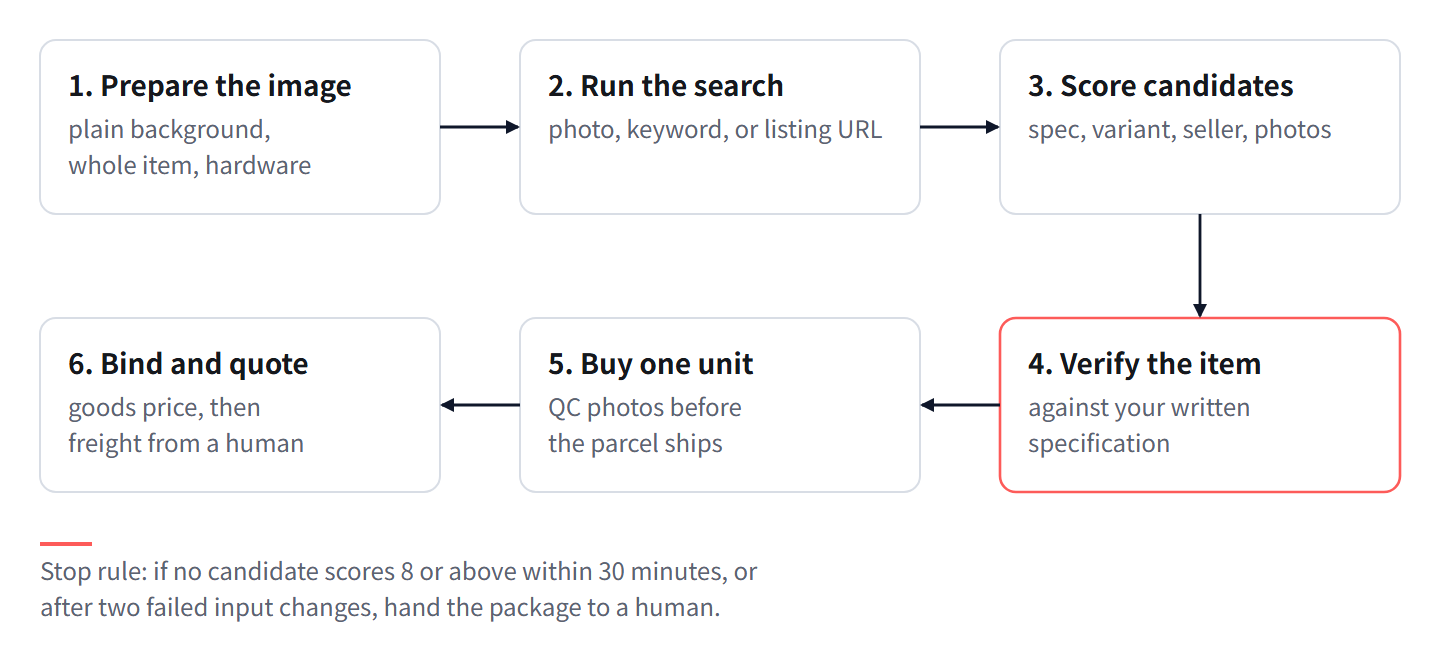
Scoring the candidates you get back
Score every candidate before you open a second one. Scoring first stops the common failure, which is falling in love with the first result that looks right.
| Criterion | Weight | How to score it |
|---|---|---|
| Specification match | 3 | 3 if dimensions, material and hardware all match what you know; 2 if one is missing; 0 if any is contradicted |
| Exact variant listed and in stock | 2 | 2 if your colour and size are listed and the seller confirms stock today; 0 if unconfirmed |
| Seller type | 2 | 2 for a factory or a trading company, 1 for a shop, 0 if you cannot tell |
| Photographic consistency | 2 | 2 if the candidate's own photographs show the same hardware at the same angle as yours; 0 if the photographs are clearly a different run |
| Listing completeness | 1 | 1 for a full variant grid and a specification block; 0 for a partial grid |
Total is 10. Take a candidate at 8 or above. Reject at 5 or below. At 6 or 7, get one more candidate before deciding, because a 6 usually means one missing specification rather than a wrong item.
Photographic consistency has its own weight for a specific reason. Two products can share a silhouette and differ in exactly the detail your customer noticed, and the photograph is often the only place that detail is visible. A fastener in the wrong place is a different product to the person who bought it.
When two candidates land within one point of each other, do not force a choice. Take the higher one and record the other as the fallback, because the fallback is what you will want in three months when the first listing disappears.
The verification step that separates the item from a lookalike
- Write down what you actually know about the item as measurements and materials, not as adjectives. Artefact: a three-line specification.
- Compare that specification against the candidate's specification block. A photograph is not a specification and never counts as verification.
- Compare the hardware in the candidate's photographs against your photograph at the same angle: fasteners, seams, port layout, label placement.
- Confirm that your exact variant is listed, and separately confirm with the seller that it is in stock today. Listed and in stock are two different facts.
- Look through the seller's other listings for the same item at a different price. A second listing by the same seller at a lower price usually means you are looking at a reseller rather than the maker.
- Buy one unit and request the QC photo set before the parcel ships. Compare those photographs against your source photograph, not against the listing, and only then release the rest of the quantity.
Artefact: either a verified link with a three-line specification attached, or a rejected candidate with the reason recorded so nobody runs the same search twice.
From raw photo to a quoted source, in order
- Save the original photograph, untouched, and write one line describing the item in your own words.
- Prepare the image with the seven steps above. Artefact: one prepared file.
- Run the automated search with the photograph and record the top five candidates, even the ones you dislike. Artefact: a candidate list.
- If nothing scores 6 or above, change the input. Take any listing URL you have for the product, extract the specification block from it, and run a keyword search with that specification. Artefact: a second candidate list, from a different input.
- Score both lists with the scoring table. Artefact: one ranked shortlist.
- Verify the highest scorer with the six steps above. Artefact: a verified link, or a decision to reject.
- Bind the verified link to the variant you are selling, or import it as a draft product. Artefact: a bound variant, so the next order of this item is a lookup rather than a search.
- Request the freight quote from the human sourcing line, with the unit count and the destination. Goods pricing came from the automated search; the freight quote cannot, because it depends on packed dimensions and the route.
Artefact at the end: a variant with a goods price, a bound link, and a freight quote requested.
When to stop and hand it to a human sourcer
The stop rule has two triggers and either one is enough. Stop when you are not at a candidate scoring 8 or above within 30 minutes of starting the automated search. Stop when you have changed the input twice and still have nothing above 6.
What you hand over is a package, and the package is what makes the human search fast: the untouched original photograph, the prepared one, the three-line specification, the candidates you rejected with the reason for each, and the unit count you need. Handing over a photograph and a hope is a different job, and it takes longer.
Here is the arithmetic on why the rule is worth having, with every input stated so you can put your own numbers in.
Assume a month with 40 find-source requests, split 20 photograph-led, 12 keyword-led and 8 URL-led. Assume resolution rates taken from your own log rather than from anything published: 0.45 for photograph-led, 0.6 for keyword-led, 0.75 for URL-led. Assume average time to a resolved answer of 20 minutes for a photograph-led request, 12 for keyword, 8 for URL. Assume that without a stop rule, an unresolved request consumes 70 minutes before it is abandoned.
Resolved requests: 20 multiplied by 0.45 is 9. 12 multiplied by 0.6 is 7.2. 8 multiplied by 0.75 is 6. Total resolved is 22.2 of 40, a ratio of 0.555. Unresolved is 11 plus 4.8 plus 2, which is about 18.
Without the stop rule: resolved time is 9 times 20, plus 7 times 12, plus 6 times 8, which is 180 plus 84 plus 48, giving 312 minutes. Unresolved time is 18 times 70, which is 1260 minutes. Total 1572 minutes, about 26.2 hours.
With the 30-minute stop rule: resolved time stays 312, unresolved becomes 18 times 30 which is 540. Total 852 minutes, about 14.2 hours.
Ratio: 1572 to 852, which is roughly 1.85 to 1. The rule saves about 12 hours a month at these assumptions.
Sensitivity, because the 0.45 assumption is the soft one. If your log shows photograph-led resolution at 0.6 instead, resolved becomes 12 plus 7.2 plus 6, which is 25.2, and unresolved falls to 15. With the rule, the total becomes 12 times 20 plus 84 plus 48 plus 15 times 30, which is 240 plus 84 plus 48 plus 450, giving 822 minutes. The saving shrinks but does not disappear, because the rule is about the unresolved tail rather than about the average.
Perguntas frequentes
Can I find a source from a screenshot of another store's product page?
Yes, if the page carries a specification block, and that is the better place to start. If the page is only images and marketing copy, treat it as a photograph and run the preparation steps first.
Why does image search return items that look similar but are not the same?
Because it matches on silhouette, colour and texture, not on identity. Add a constraint that silhouettes cannot express: a dimension, a material, or a model code.
How many candidates should I look at?
Five. Score them, take anything at 8 or above, and keep the runner-up recorded as a fallback rather than discarding it.
Does the automated search give me the shipping cost?
No. It returns candidates and goods pricing. The freight quote goes through the human sourcing line, because freight depends on packed dimensions and the route, and the parcel is only measured once it reaches the warehouse.
The item only exists on one small shop with thin listings. What then?
Buy one unit, request the QC photo set before it ships, keep the link and a screenshot in your own records, and score a second candidate while the first still works. A single-shop SKU is a reorder risk rather than a one-off one.
O que fazer esta semana
- Take the three product photographs sitting in your inbox and run the seven preparation steps on each.
- Write a three-line specification for each before you search, so verification happens against facts rather than against images.
- Set a 30-minute timer the next time you run a search, and stop when it goes off.
- Score your last five sourced items with the scoring table and see how many would have passed at 8.
- Bind every verified link to its variant today, so the same search never has to happen twice.
Escrito e mantido pela equipa de sourcing da Lovegodrop. Como estas páginas são escritas e verificadas.
Comece por um pedido que já vendeu
Ligue uma loja Shopify ou WooCommerce, escolha um pedido já pago e veja o orçamento de sourcing e de envio para esse pedido específico antes de assumir qualquer compromisso.